can I use Gemini AI tool for removing watermark from a photo?
Gemini Apps supports uploading a photo and requesting an edit. That makes an editing request possible; it does not establish that a particular watermark will disappear cleanly or that hidden detail will be recovered. Cleanmark's Gemini corner tool does a different job: it reverses a supported visible corner overlay on a Gemini export. It does not send your photo to Gemini.
Use a photo you own or have permission to edit. We have not run a Gemini removal test for this page. The measured example below uses the unchanged Cleanmark manual brush.
Choose the workflow by the file you have
Existing photo, arbitrary mark
A Gemini image-editing request works on an uploaded image. Check whether your account has image editing, and inspect the returned file rather than assuming an instruction succeeded.
Gemini export, matched corner
The corner-overlay tool checks supported layouts and reverses blending. It does not reconstruct arbitrary objects or use a prompt.
A measured local alternative, not a Gemini demonstration
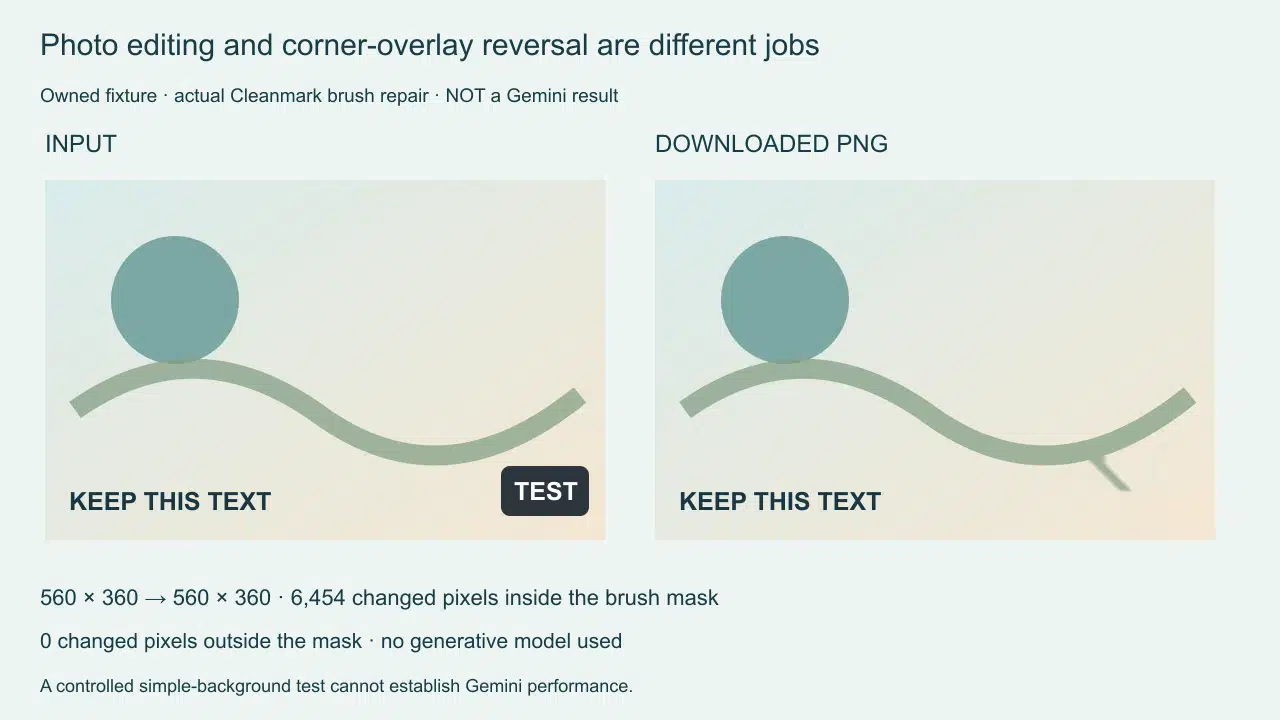
For this page we uploaded an owned 560-by-360 graphic into the unchanged homepage tool. It contains a separate KEEP THIS TEXT label and an artificial TEST badge over a simple background. Three manual strokes covered the badge, then the repair completed and we downloaded the actual PNG. The downloaded dimensions remained 560 by 360.
The captured selection contained 9,189 pixels. Comparing the canvas before and after repair found 6,454 changed pixels inside that selection and zero changed pixels outside it. The separate text region also had zero changed pixels. The browser reported no application errors. These counts describe this fixture and these strokes, not a success rate for photographs.
The comparison has an important negative result: nothing here tells us how Gemini would handle the same file. We did not submit it to Gemini, and the local brush did not call a model. A changed badge region proves that the local repair ran; it does not prove the hidden original scene was recovered. The simple background was deliberately controlled, so this example cannot stand in for hair, faces, foliage or a large central mark.
If you try a different repair, compare more than the former badge. Keep the untouched file and inspect nearby text, object boundaries and unrelated parts of the composition. A clean-looking corner alone does not establish that the rest of a returned image stayed unchanged. Our zero-outside-mask observation applies only to the measured local run above.
What a supported edit does not promise
Google's current image-editing help permits uploaded-image edits, requires sign-in and applicable eligibility, and warns users to respect copyright and privacy. An editing feature description is not a watermark-removal guarantee. We have no measured Gemini output to supply here; model-specific effectiveness remains untested.
For a private file you do not want to upload, the local image tool repairs a painted area with neighboring pixels. It does not run a generative model. Large selections and complex textures can leave visible artifacts. An arbitrary central mark requires the manual brush; do not interpret a corner-layout feature as automatic central-mark detection.
Make the choice without confusing the tools
Use Gemini Apps only if an uploaded editing workflow fits your permissions and needs. Use the matched corner tool for a supported Gemini overlay, or the local brush for a bounded manual repair. Keep those three scopes separate when judging the result.