How can you remove watermarks from a PDF?
First determine whether the visible watermark is a separate PDF element or baked into a page image. Use a PDF editor's watermark-removal workflow for supported watermark elements; a flattened page needs a different image-editing decision. Cleanmark cannot open or export PDFs. Its image brush is not a PDF watermark remover.
Separate element
Inspect the document structure before deleting anything.
Flattened page
A visible label can be part of the same image as the document.
Cleanmark boundary
PNG, JPG or WebP input; PNG output. No PDF output.
Our controlled document and input tests
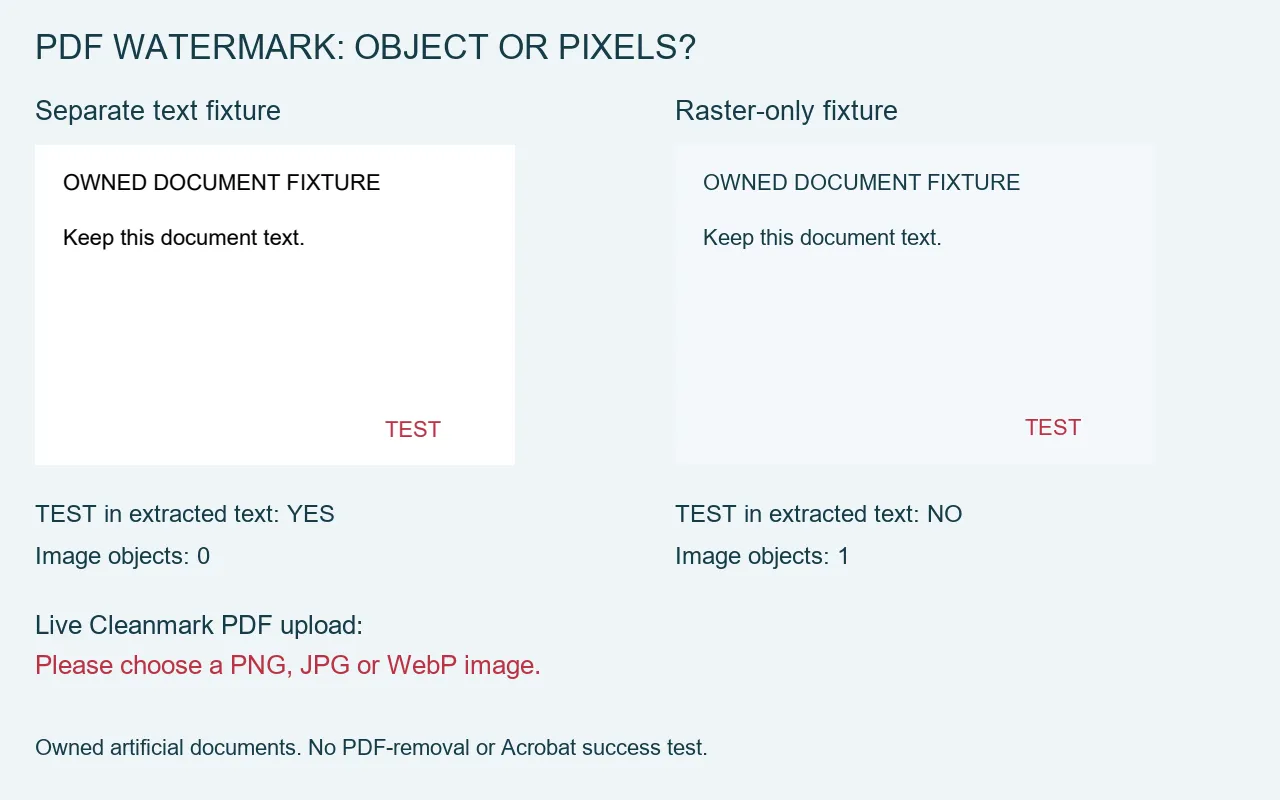
We created two rights-owned artificial documents with a small TEST label. Both pages were designed at 480 by 320 points. The first kept its heading, document sentence and TEST label as PDF text. The second stored a rendered drawing as a single page image. These are controlled examples, not scanned customer files, protected proofs or editor trial exports.
Our local PDF parser extracted the heading, document sentence and TEST from the text fixture. Its page resources contained zero image objects. From the raster fixture, the same parser extracted no text and found one image object. The label was still visible when we rendered that second page. A failed text extraction therefore did not mean that its visible mark was absent.
This comparison answers a practical diagnostic question: can a label be addressed as separate text in this file, or is it already part of the page image? It does not establish that every editor can identify that label safely. We did not run OCR, remove a PDF object, test a paid editor or measure recovery of covered document detail.
We also selected the actual text PDF through the unchanged live Cleanmark file chooser. The page responded: Please choose a PNG, JPG or WebP image. It did not load a PDF editing canvas or offer a cleaned PDF download. This was a real input test, not an inference from the filename extension. The parser results and rendered examples were retained separately from the browser observation.
Those observations separate two boundaries. Changing a visible mark in a raster image is not the same operation as deleting a PDF text element. Likewise, saving a repaired picture as PNG does not retain an editable PDF document. Our test supports these narrow distinctions; it is not a general promise that a watermark will disappear from your file.
When the editor recognizes a watermark
Adobe's current desktop instructions describe opening Edit a PDF and choosing the watermark removal command. The documented process includes selecting files and output options. That is a specific supported workflow, not evidence that an arbitrary badge made by another editor will be recognized or that text burned into a scan will become a removable watermark element.
Work on a copy of a document you own or have permission to edit. Preserve the original and inspect the saved result, including wanted text and page layout. We have not tested Acrobat on these fixtures, so no success rate, price or version-specific guarantee is supplied here.
When the mark is part of an image
If you work on an authorized raster copy, the existing image brush can attempt nearby-pixel repair on a small selected area. It does not edit PDF objects, preserve PDF structure or run a generative reconstruction model. Arbitrary interior marks require manual brushing; automatic edge detection does not establish central-mark repair.
A raster copy changes the workflow. Keep the PDF as well as any exported picture, and do not describe a PNG download as a repaired PDF. If the label covers important document characters, replacement pixels cannot prove what the hidden original said. The separate image text-removal tool has the same pixel-repair boundary.
For this question, check the file layer before choosing an eraser. A readable TEST element and a visible TEST in a page image can look similar while requiring different operations.