Is there a way to keep the photo metadata but remove the device name from it?
Yes, you can try removing only the visible device-name label while leaving the displayed ISO and shutter information alone. Use the manual brush and keep the wanted text outside the selection. That does not mean the downloaded file keeps its embedded camera metadata: our JPEG-to-PNG test preserved the displayed settings but did not carry over the input EXIF fields.
On the image
Camera settings printed in a watermark are visible pixels. A narrow selection can leave those pixels alone.
Inside the file
Embedded camera fields are separate data. Inspect the exported file rather than judging them from the picture.
What we actually tried
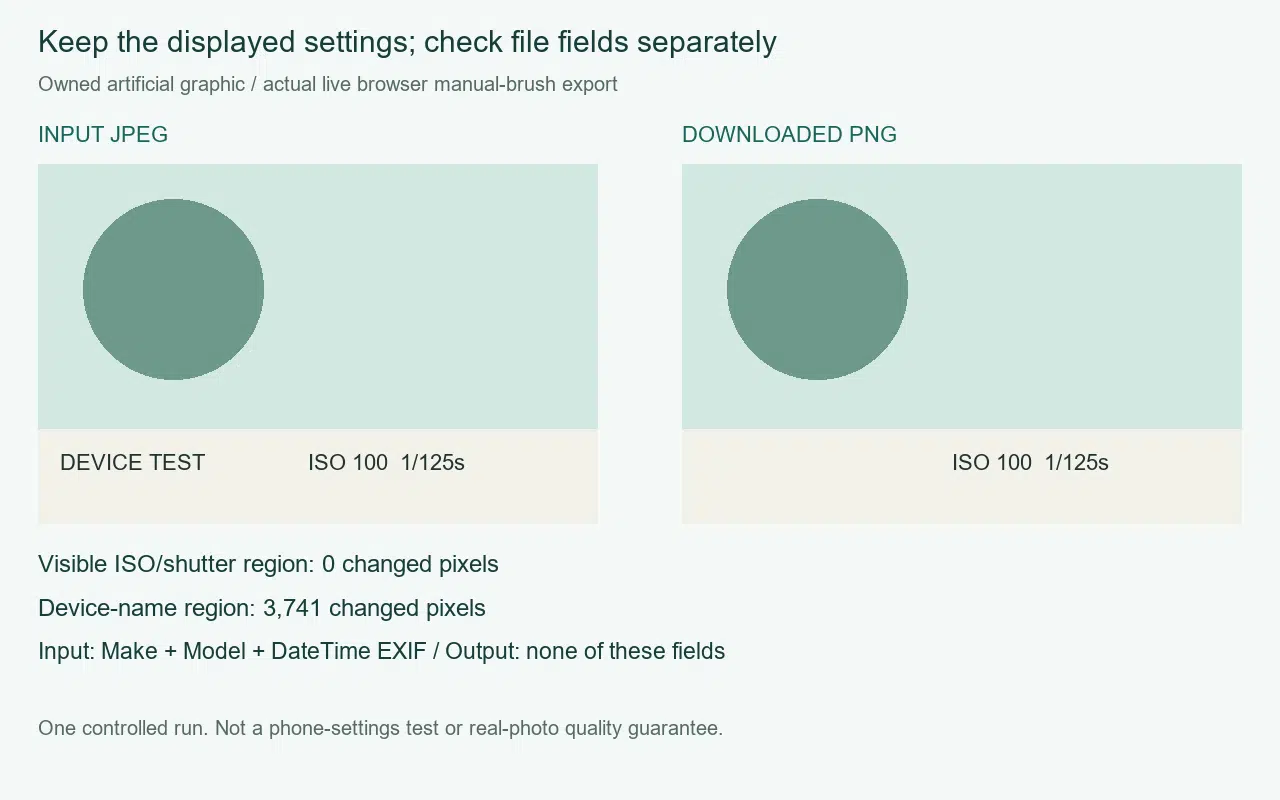
We made an owned camera-style graphic with a DEVICE TEST label on the left and ISO 100 1/125s on the right. These were artificial labels, not the measured settings of a camera photograph. The JPEG also contained three deliberately non-personal EXIF fields: Make was Cleanmark, Model was CONTROLLED TEST, and DateTime was 2026:10:09 09:00:00.
The input measured 560 by 360 pixels. We uploaded it to the unchanged live browser tool, painted one stroke across the device-name label, clicked Remove watermark, and used Download PNG. The output also measured 560 by 360. This was a completed browser export, not a simulated repair or a screenshot saved as the result.
Comparing the decoded input and output found 3,741 changed pixels in the device-label rectangle. The separate rectangle containing the displayed ISO and shutter text had zero changed pixels. That observation supports selective preservation for this particular separated layout. It does not establish a removal success rate, and it does not test overlapping labels or detailed photographic backgrounds.
The downloaded PNG had no EXIF fields when inspected. Its chunk list contained only IHDR, IDAT and IEND; no eXIf chunk was present. The input Make, Model and DateTime values were therefore not preserved in that output. The visible settings survived as pixels while the embedded test fields did not survive as metadata. Neither finding can substitute for the other.
We deliberately used an uncomplicated background and a gap between the labels. The result does not tell us how a particular phone firmware behaves, whether it has a settings-only watermark option, or what a repair would do on a real photo. Keep those claims out of the decision.
Choose the part to preserve before brushing
If the device name sits apart from the settings, open the local image tool and select only that name. Leave a gap around text you want to keep. Inspect the exported copy at full size. If the name overlaps the wanted lettering, nearby-pixel filling cannot reveal the original hidden letters.
An arbitrary label away from a supported edge or corner needs the manual brush. Do not rely on automatic detection for this job. The repair fills selected pixels from neighboring pixels; it does not run a generative model. Complex backgrounds and large selections may leave artifacts. Use only images you own or have permission to edit.
If the stored camera fields matter
Keep the untouched JPEG as your metadata-bearing original. The current tool exports a PNG from its editing canvas; it does not offer an EXIF-copy option. Do not treat the cleaned copy as an archival replacement for the original. Our earlier visible-mark and file-data test explains why appearance and file signals need separate checks; the nearby-text experiment covers the selection boundary.
For this question, success has two separate meanings. The wanted settings can remain readable on the image, yet the output can still lack the embedded fields. Decide which one you need, and retain the original whenever the file data matters.