Why can't I download PNGs with a transparent background?
A PNG can contain transparency, but saving as PNG does not turn an opaque white background into transparent pixels. Check the exported file's alpha values, then place it over a contrasting background. Cleanmark can repair a visible mark in an image you own; it is not a background remover. Our browser test retained the top transparent regions but changed some alpha values near the brushed area.
File format
PNG supports transparency. The extension alone tells you nothing about which pixels are transparent.
Pixel values
Opaque white and transparent are different. A white preview can hide that difference.
Export result
Inspect the downloaded copy. A successful download is not proof that all alpha values survived.
What our actual brush export retained
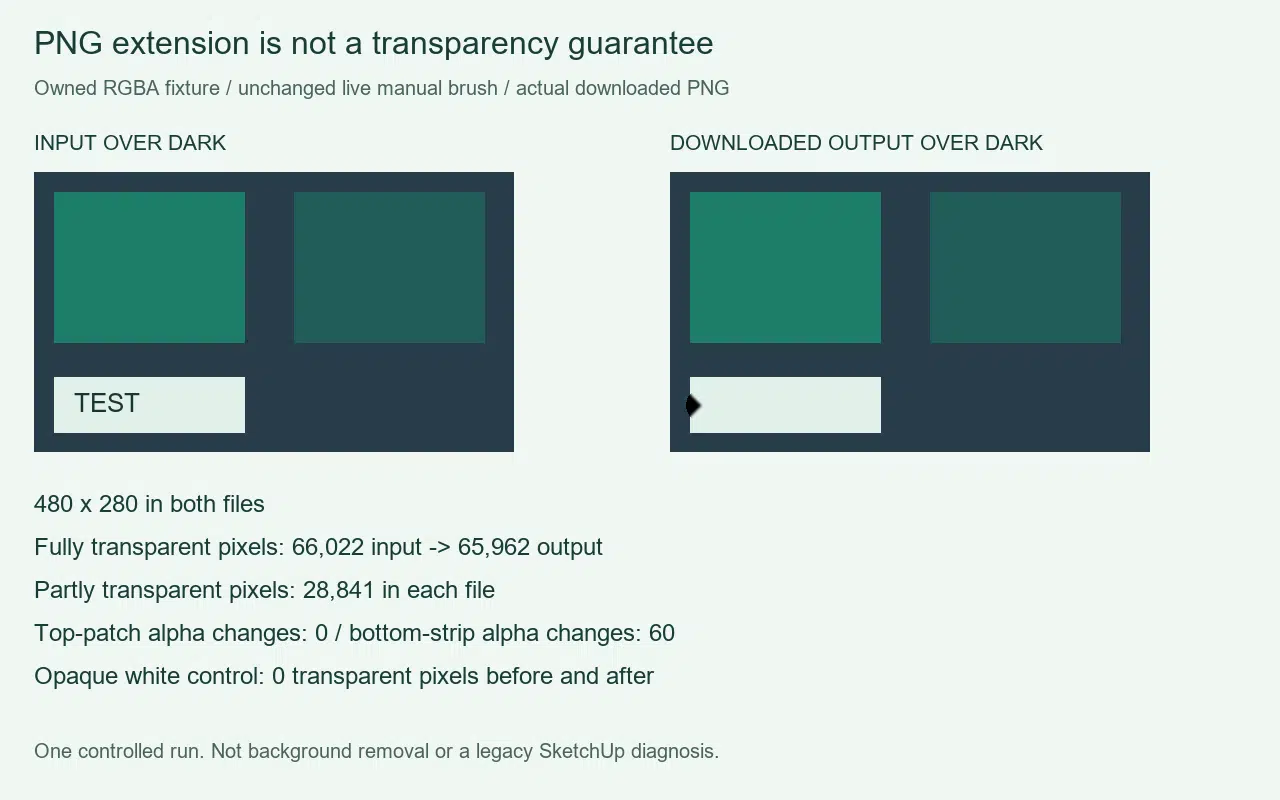
We made a rights-owned artificial PNG measuring 480 by 280 pixels. It contained a fully opaque green patch, a partly transparent green patch, transparent surrounding space and a small TEST label on an opaque bottom strip. A second version flattened the same drawing over white. Neither input was a photograph, a SketchUp render or a recovered original.
We uploaded the transparent input to the unchanged live Cleanmark tool. A manual stroke selected the TEST label, then Remove watermark produced a preview and Download PNG saved the actual result. We repeated that workflow with the white-background control. Both downloaded files measured 480 by 280 pixels. No simulated repair was used for either output.
The transparent input had 66,022 fully transparent pixels; the downloaded output had 65,962. Both had 28,841 partly transparent pixels. Comparing alpha values found 60 changes in the whole image. All of those changes fell in the bottom strip, where the brush repair occurred. In the separate top-patch rectangle, no alpha value changed. This is a bounded observation, not a promise that every mask preserves transparency.
The opaque-white control had no fully or partly transparent pixels before repair and none afterward. The brush did not turn its background transparent. This makes the distinction visible: keeping transparency already present and creating a new transparent background are different jobs.
We also compared full RGBA values. The top patch had 28,841 changed pixel tuples even though its alpha values were unchanged. That is why alpha retention must not be described as exact whole-pixel retention. This experiment does not isolate the cause of those color differences. We did not test every browser, image editor, export setting or semi-transparent watermark.
The evidence graphic places both files over the same dark color for comparison. That color is a display backing, not a newly exported background in either tested PNG. The original files and downloaded copies were inspected separately; we did not count transparency by guessing from the preview. Keep the original if alpha precision or exact color values matter.
Diagnose the file before changing the picture
Open the exported PNG in an editor that can show transparency, and compare it over light and dark backgrounds. If the white area stays white in both views, do not assume it is transparent. Inspect alpha or transparency information where your editor exposes it. If you need transparency from a model export, review that application's export options rather than changing only the filename.
Current SketchUp documentation describes a Transparent Background option for PNG and TIFF exports. That does not diagnose an individual scene, a glass material or an older desktop version. Without the original model and export conditions, the exact reason for a particular white window is unknown. Do not install an old application or change materials on the strength of a generic PNG answer.
Where watermark repair fits
Use the existing local brush tool only for a visible mark in an image you own or have permission to edit. Keep your selection narrow and inspect the downloaded result. Arbitrary marks in the middle of an image need the manual brush. Nearby-pixel filling does not run a generative model and cannot recover original detail hidden beneath an opaque mark.
The current repair code assigns opaque alpha to filled mask pixels. It therefore has no promise to reconstruct the original transparency inside the selected area. Transparent edges require particular care; preserving an unselected region does not guarantee the boundary stays identical. This page reports an export test, not a new background-removal feature.
If your actual file is an animated GIF, see the separate animation and transparency boundary. A static PNG alpha check does not establish frame or timing retention. For this question, the next useful check is the downloaded file's alpha, not another guess from the white preview.