How can I get a gif with the background removed and no watermark?
You need an animation editor that can remove the background across the frames and export a transparent animated GIF without adding a stamp. Cleanmark cannot deliver that output. Its image tool accepts PNG, JPG/JPEG and WebP and downloads a PNG. Uploading your animated GIF here does not start an animated background-removal job.
Keep three requirements separate: the visible stamp must be absent, the background must really be transparent, and the downloaded file must still animate. A clean-looking still frame does not meet all three.
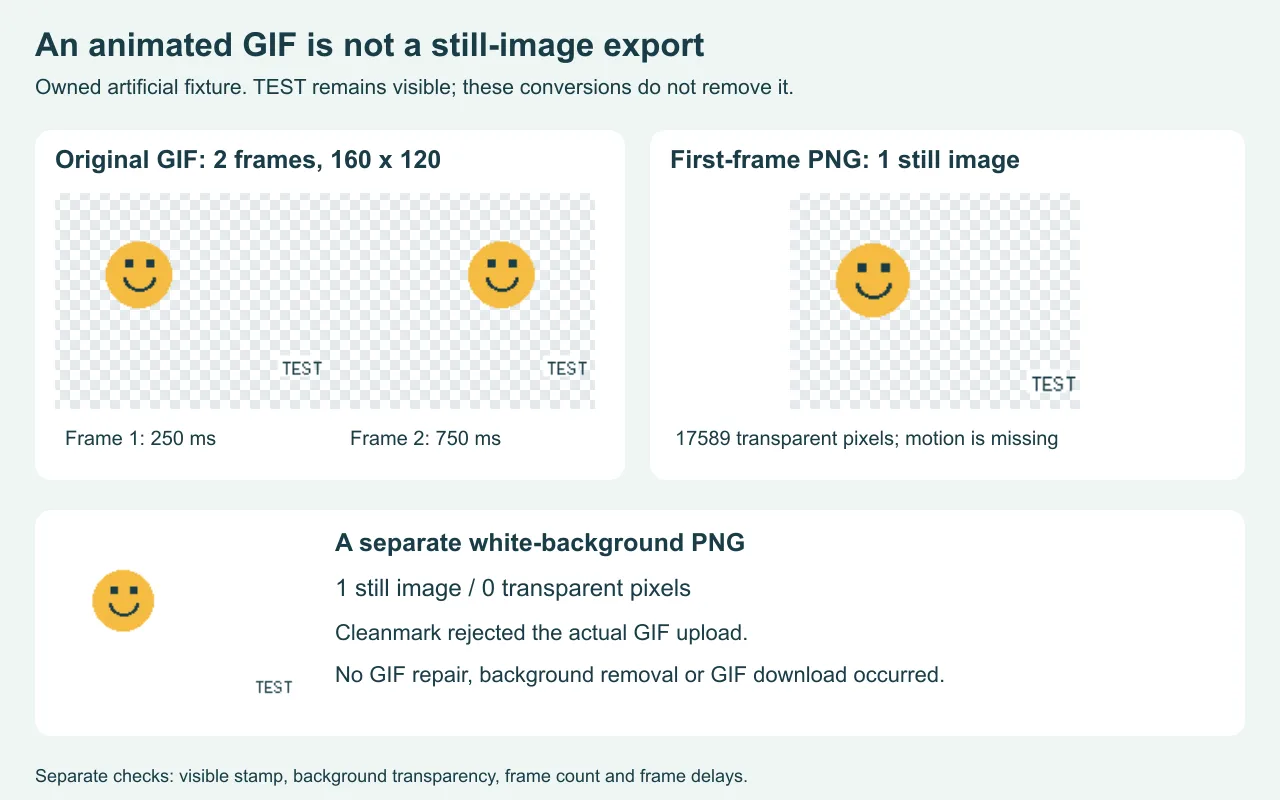
What happened when we tried the GIF here
We made a GIF measuring 160 by 120 pixels with two different smiley positions, transparent space around them and a small artificial TEST badge. The saved file measured 2475 bytes. We reopened it and decoded both frames instead of assuming that the animation survived encoding.
Then we selected that actual GIF through the unchanged Cleanmark homepage file chooser in a browser. The page displayed “Please choose a PNG, JPG or WebP image.” Remove watermark stayed disabled, and no download button was visible. No animated repair ran and no GIF result was produced. That is a format boundary, not a failed attempt to reconstruct the smiley.
A transparent still frame can still be the wrong result
Our decoded GIF had two frames, with delays of 250 and 750 milliseconds. Each frame had 17589 fully transparent pixels. We extracted the first decoded frame into a PNG outside the public tool. Reopening that PNG found one still image at the same 160 by 120 dimensions and 17589 transparent pixels.
The background transparency survived that extraction, but the second smiley position and the sequence of frame delays did not become a moving PNG. One frame replaced a two-frame animation. The artificial badge also remained. This controlled extraction does not demonstrate watermark removal, and it is not a conversion feature offered by Cleanmark.
In a separate comparison, we composited that first frame over white and saved another PNG. Reopening it found zero transparent pixels and one still image. Both PNGs could look similar on a white page, but they differ when placed over a colored background. The dimensions stayed fixed throughout these experiments; matching dimensions did not preserve motion or prove transparency.
Check the actual exported file
Background
Inspect the export over a contrasting background. White pixels are not the same as transparent pixels. A checkerboard drawn into the image is not transparency either.
Motion
Open the downloaded animation and compare its changing frames and timing with the original. Do not judge the result only from an editor's preview or a thumbnail.
Visible stamp
Inspect the frames containing the mark. Removing a background and removing a visible stamp are different edits; neither automatically establishes the other.
The GIF89a format stores a transparent color index and timing information for graphics. That transparency mechanism should not be mistaken for smooth, partial alpha blending at every pixel. Our decoded measurement counts fully transparent pixels; it does not rate the appearance of a cutout's edges.
If an editor offers an authorized clean export of your own animation, check that export before repairing marked frames. We have not tested an unnamed service's current pricing, watermark policy or animation export. This page does not promise that a particular service can satisfy the request.
Where the existing tools fit
The still-image brush can attempt nearby-pixel repair on a supported picture you own or have permission to edit. It does not process a GIF sequence or remove an entire background. For a mark in the middle of a still image, choose the manual brush; the automatic edge trial does not promise to locate central marks. Complex texture and large selections can leave a visible patch.
The video edge crop produces a silent WebM. It is a different output, not an animated transparent GIF, and it does not reconstruct a mark crossing the subject. Neither path should be presented as a shortcut to the output asked for here. Preserve your animation's original and reject an export that loses the part of the request you need.