Is it still bad and something that affects the quality of the image?
Not necessarily. A smaller exported image file does not, by itself, establish damaged picture quality. Check its pixel dimensions and decoded pixels separately from its byte length. In our controlled PNG comparison, the file got smaller while every decoded pixel stayed the same. A watermark repair is a different operation: it replaces selected pixels, so an unchanged width and height do not mean an unchanged picture.
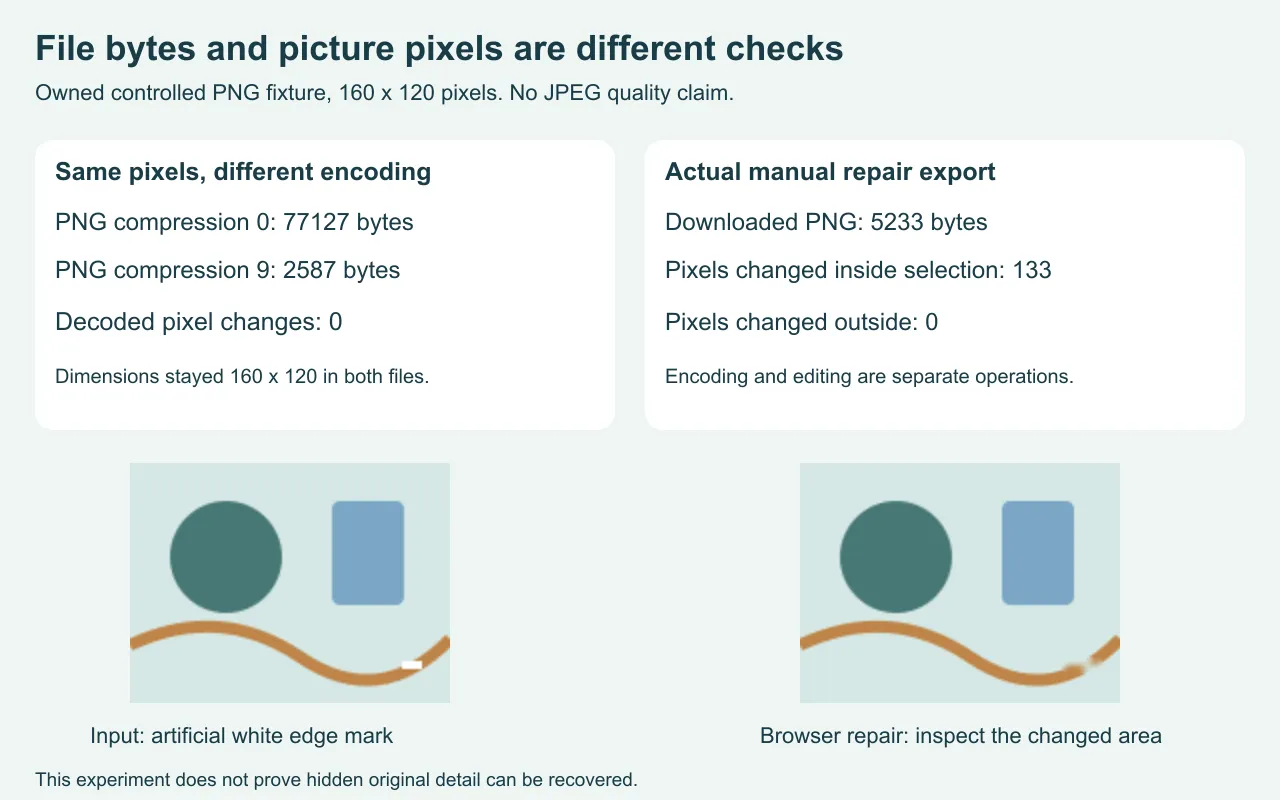
What happened when only the PNG encoding changed
We made an owned drawing measuring 160 by 120 pixels with a small white mark near its lower-right edge. We encoded the same RGBA pixel buffer twice, with PNG compression levels 0 and 9. We kept the channel settings and pixel dimensions fixed. The first file measured 77127 bytes; the second measured 2587 bytes. We decoded each saved file and compared every pixel, including alpha, against the source buffer. Both comparisons found zero changed pixels.
The byte reduction was 77127 minus 2587, or 74540 bytes. No picture rows or columns were removed. These compression numbers describe the encoder settings in this experiment; they are not quality percentages. This is one measured counterexample to treating a smaller file as proof of damaged pixels. It does not say that every way of making a file smaller preserves a picture.
What changed during an actual watermark repair
We uploaded the first PNG to the unchanged Cleanmark browser tool, painted the artificial mark, pressed Remove watermark and downloaded its PNG. The file measured 5233 bytes and remained 160 by 120 pixels. The brush mask contained 156 pixels. Comparing the decoded download with the decoded input found 133 changed pixels inside that selection and 0 outside it. The browser recorded no application errors.
That repair test answers a different question from the compression comparison. A file can keep its dimensions while selected colors change. The downloaded byte count alone cannot tell you whether those replacement colors look convincing. Inspect the repaired corner at full size. This drawing has a simple background and a tiny artificial mark; it cannot establish performance on real photographs, faces or complex textures.
Separate the export checks before judging the result
Dimensions
Compare the width and height in pixels. If they changed, evaluate the framing or resizing separately.
Decoded picture
Compare the actual pixels or inspect the repaired area. Equal dimensions do not prove equal pixels.
File bytes
Record the format and byte length. Treat the number as a storage measurement, not a repair-quality score.
PNG is a lossless image-storage format. That describes its encoding, not an earlier editing operation. It does not restore pixels that an eraser, resize or other edit already changed. Likewise, an output PNG does not establish that hidden original detail beneath a mark has been recovered.
Cleanmark accepts one PNG, JPG/JPEG or WebP image and exports PNG. An input with a longer side above 2400 pixels is resized proportionally before editing; our small fixture did not reach that condition. This page does not add a compression control, batch mode or another output format.
For a mark in the middle of a picture, use the manual brush. The automatic edge trial does not promise to locate central marks. Nearby-pixel repair can leave blur or patches and does not run a generative reconstruction model. If important detail is covered, the salvage-quality decision explains why obtaining a clean original is different from replacing pixels.
The practical result is limited but useful: in this PNG encoding test, fewer bytes did not mean different decoded pixels; in the actual repair, equal dimensions did not mean an unchanged picture. Keep the original, compare the changed area and edit only files you own or have permission to edit.