How to remove date and time from photos
Brush over a small burned-in date stamp on a simple background; stop if it crosses subject detail. Keep the original, select only the unwanted date and time, preview the repair, and download a copy. In our plain-background test the stamp wiped away cleanly. The same brush over a detailed subject left damage, so that result should be rejected.
Remove date stamp from photo
Start with one PNG, JPEG or WebP still image. In the linked editor, choose the image, paint a narrow selection over the visible digits and any outline, then select Remove text. Inspect the preview before using Download PNG. Keep the brush away from details you want to preserve. If the date lies outside useful composition, cropping in an image editor may be the safer choice; it discards that edge rather than inventing texture.
How to remove date stamp from photo
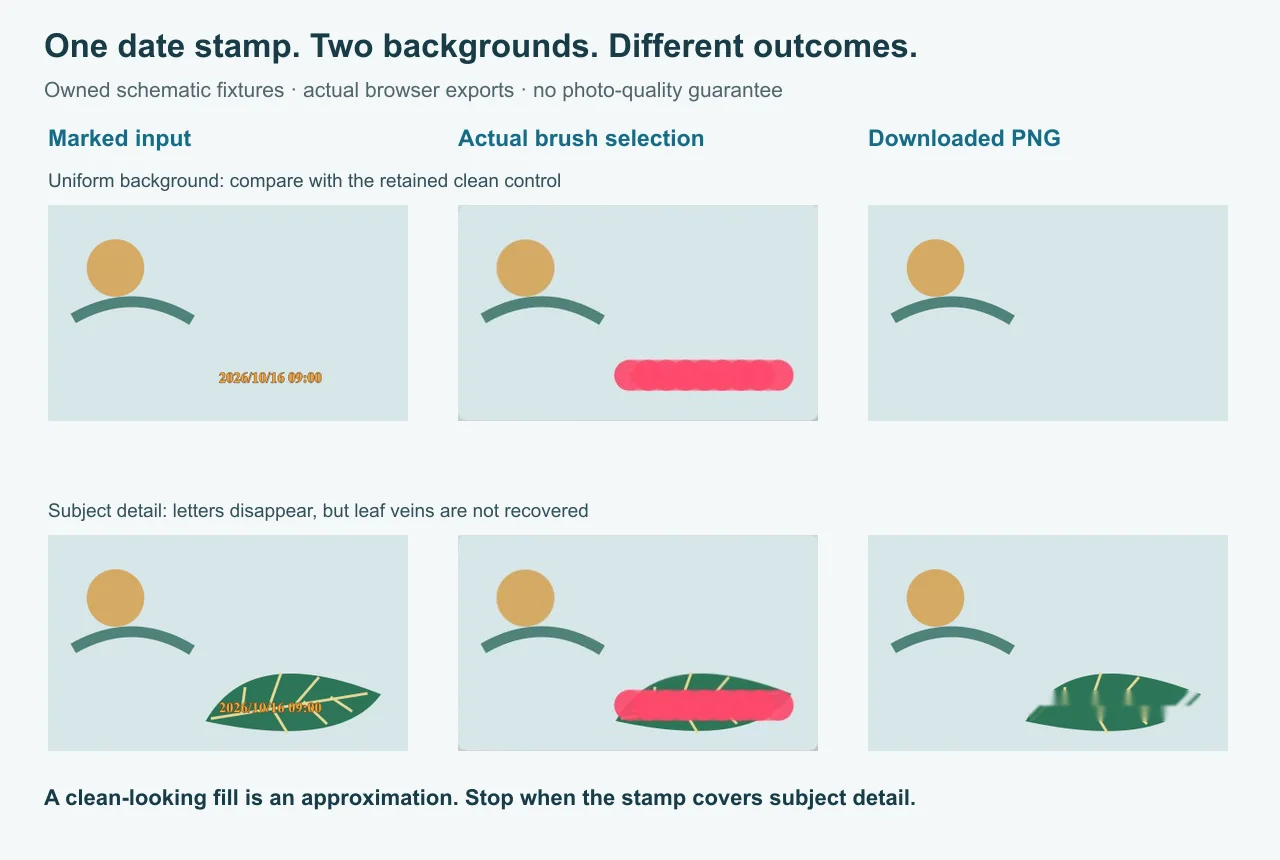
| Decoded RGB measurement | Plain background | Detailed subject |
|---|---|---|
| Pixels changed from marked input | 1,153 | 4,044 |
| Output pixels different from retained clean control | 0 | 3,690 |
| Changed pixels outside the conservative inspection box | 0 | 0 |
| Output dimensions | 400 × 240 | 400 × 240 |
What was measured: a pixel counts as different when any decoded red, green or blue channel differs. We compared the full input and downloaded output, and separately compared the output with the clean image we retained before adding the stamp. The plain output matched that clean control in all decoded RGB pixels; this does not mean its PNG file bytes matched. The detailed output differed from its clean control at 3,690 pixels. That is evidence of a failed detail repair in this fixture, not a score predicting another photo.
What is approximate: the inspection box runs from x = 170 to 379 and y = 168 to 213, a 210 × 46 rectangle conservatively enclosing the visible brush stroke. It is a boundary approximation, not a pixel-exact export of the brush's alpha mask. The zero outside-box counts are exact for that stated rectangle; they do not establish that every pixel outside the exact brush mask was unchanged. No success rate, inferred quality percentage or general camera behavior is claimed.
What the fill approximates: it blends nearby colors into the selection. Our clean controls exist only because we built the fixtures. A real flattened photo normally does not give you that hidden clean reference. Removing readable digits is therefore not enough to accept a repair: the detail they crossed must still make visual sense. Here the leaf veins do not, so stop rather than repainting a larger area.
Inspect the actual files:
Plain marked inputPlain clean controlPlain downloaded outputDetail marked inputDetail clean controlDetail downloaded output





Other date-and-time wordings, one workflow
Remove date stamp from pictures
Use the same brush on an individual supported still image. The pictures can contain different scenes, so inspect each separately. This page does not provide an automatic batch remover.
Remove timestamp from photo
A visible row of digits is the target here. If the date appears only in a gallery's interface and is absent from the actual image, there are no corresponding digits for this pixel brush to erase.
Remove date from photo
This means a date printed in the picture. It does not mean changing when the photo was taken or editing a file's embedded date. Those are separate tasks, and this page is not a metadata editor.
Remove time stamp from photo
Include the unwanted clock digits, separators and visible outline in the selection. Keep a larger safety gap from nearby subject detail; a thicker brush is not a way to recover what the stamp obscured.
How to remove a timestamp from a photo
Check for an available clean original before repairing pixels. If a disposable border contains the stamp, crop that edge in an image editor. If composition must stay, try the tight brush only over uncomplicated background.
How to remove the date stamp from a photo
Look at the former stamp location at full size after the digits disappear. Reject a repeated edge, smear or broken line. Do not judge the result only from a small thumbnail.
How to remove date and time stamp from photos
Date-only, date-and-clock, and differently spaced digits are the same visible-text action. They do not need separate landing pages or a different model. Keep each source file and check each export; this is a one-image-at-a-time workflow.
Choose the related page for a different subproblem
Use the general text brush for other unwanted captions and labels. The already-saved-photo decision page covers checking for a retained original before crop or repair. The camera-information comparison tests keeping wanted visible settings while removing a separate device label; that is a different target from this date-stamp pair. A visible result does not promise that embedded camera metadata survives export.