Remove TikTok Watermark
Remove a small TikTok watermark from a saved video for free: select the marked area and its time range, then export the repaired WebM with audio. Best for simple backgrounds; replacement pixels are estimated and complex details can smear.
Local files only. No link download or automatic tracking. Use media you own or may edit, and keep the original.
Up to 50 MiB, 60 seconds, and 1280 pixels on the longer side. No upload or account. Browser decoding and recording support are required.
Coordinates are source pixels from the top-left. Include the entire mark inside the box, leaving a clean one-pixel sampling border around it. If it switches positions, use a second box with the corresponding start and end time. Boxes do not follow a moving mark.
Choose a short local clip to begin.
Download repaired videoRepair a saved file
- Choose your own video and keep an untouched copy.
- Scrub the source to find where the visible mark appears. Set a tight rectangle around it.
- Set the time range. Enable the second zone only if another fixed position needs repair.
- Inspect the repaired preview on representative frames. Stop if a face, text, or textured detail becomes smeared.
- Keep this tab visible during export. Download the WebM and play it to check picture, sound, and timing.
What the patch changes
The tool reads pixels immediately outside each selected rectangle and interpolates an estimated patch on every active frame. It does not crop the composition, identify TikTok accounts, obtain a cleaner source file, use an AI model, or verify ownership. A small mark over a simple background is the intended case. Interpolation can remove an important line along with the mark; removing the visible lettering is not proof that the underlying scene was restored.
Each zone must be inside the frame with a one-pixel border, cover no more than 12% of the image, and remain separate from the other zone. Combined zones cannot exceed 20%. These limits keep the repair small; they are not quality guarantees. If the mark moves within the frame, the boxes must cover its positions or the clip needs a different editor with tracking.
Audio and export limits
The browser re-records repaired frames and routes the source media audio through Web Audio into the same WebM. A source with no sound remains without meaningful sound. This does not preserve the original compressed audio, MP4 container, frame timestamps, bitrate, HDR, metadata, or project layers. Check the saved result. Export runs in real time; hiding the tab cancels it instead of silently returning a stalled recording.
Same-file test: before and after
We ran the production tool again on 24 October 2026, selected the same owned six-second clip, set both repair zones, and downloaded a new result. This is a synthetic TEST overlay on a plain background, not a downloaded TikTok export. The comparison below uses frames extracted from that exact input and the newly saved output at one and four seconds.
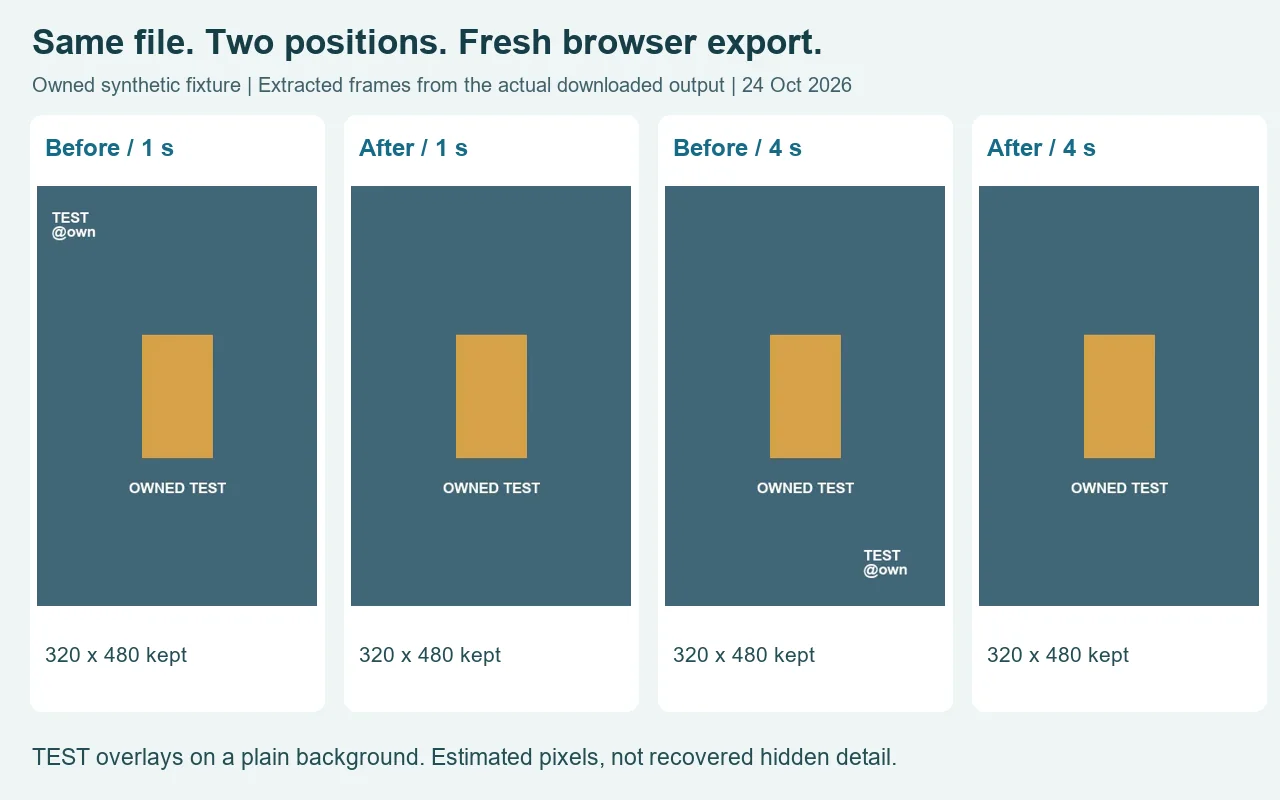
The new WebM was 114,406 bytes and decoded successfully. Both extracted output frames measured 320 by 480 pixels, and decoded audio had a nonzero signal. The source and exported audio decoded to different durations, so keeping an audible track does not mean preserving exact timing or the original audio encoding. Play the saved file before using it.
Repeat this same-file comparison using the owned input clip and this run’s saved output. The coordinates and the earlier failed short-box test are recorded below. They explain why covering all the lettering and leaving a clean sampling border matters more than a tidy thumbnail.
What our saved-file checks found
We made two synthetic clips ourselves, then used the same file chooser, zone controls, export button and download link shown above. They were prepared on 23 October and tested on 24 October 2026. They are controlled fixtures with TEST lettering, not downloaded TikTok exports or proof that every TikTok layout works. The clean-background clip contains two fixed positions: one in the upper-left during the first half, and one in the lower-right during the second. It also carries an audio tone.
The complete source video has 150 frames at 25 frames per second, a 320 by 480 pixel frame, six seconds of video and an AAC audio stream. We set the first box at X 14, Y 24, width 80, with a time range from zero to three seconds. The second starts at X 224, Y 410, with the same width, and runs from three to six seconds. Those coordinates belong to this fixture. They are not default TikTok watermark locations and should not be copied onto an unrelated video.
The first saved result taught us something that a clean thumbnail hides. A box height of 36 pixels removed most of the white lettering, but its bottom sampling edge still touched the mark. The patch carried a bright vertical streak into the repaired area. Enlarging both boxes to 44 pixels included a clean border. We exported and downloaded again; frames extracted at one and four seconds showed the selected lettering gone on the flat background, while the central object and full frame remained. The first, imperfect output was retained rather than reported as a pass.
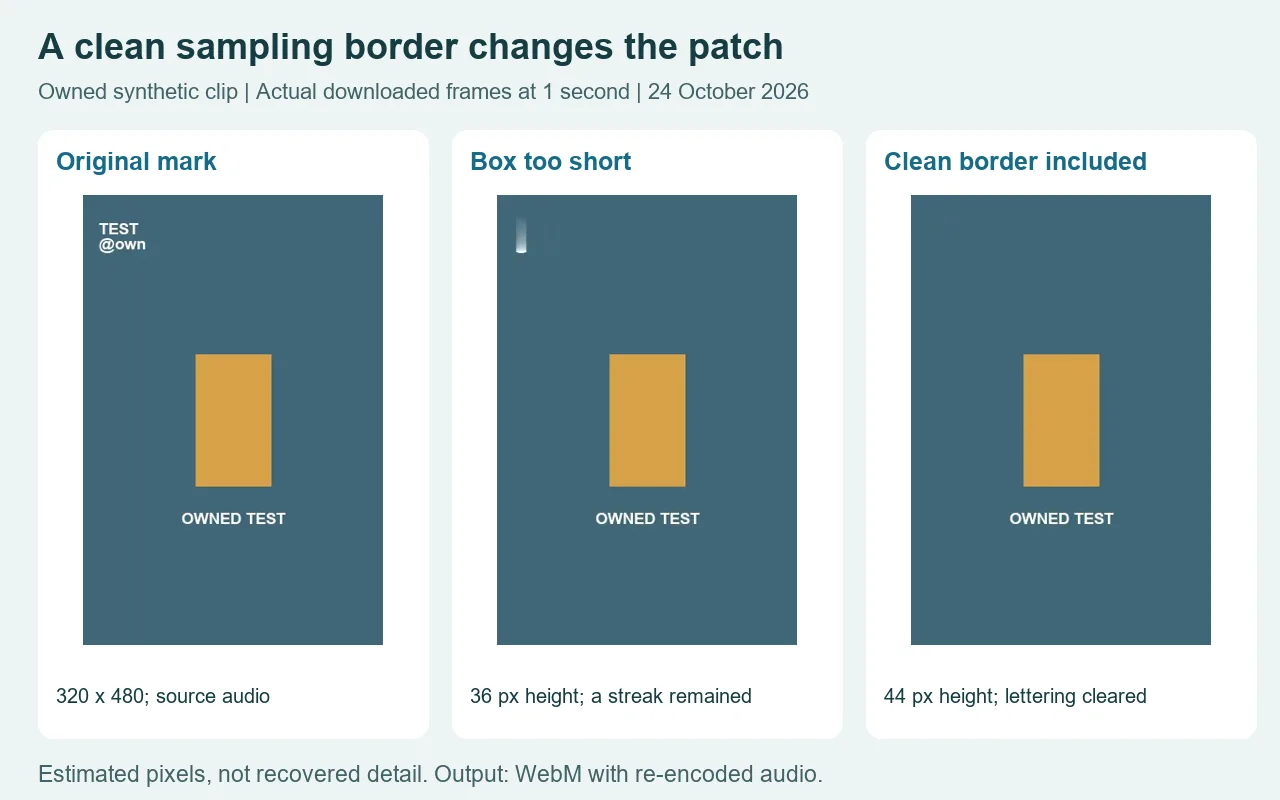
The successful downloaded WebM measured 116,809 bytes. Independent decoding found VP9 video at the same 320 by 480 dimensions and an Opus audio stream at 48,000 Hz. The audio decoded to six seconds and had nonzero signal energy: it was not merely a silent audio track attached to a video. The source had mono AAC, while the recording produced stereo Opus. That difference is why this page says the audio is routed and re-encoded; it does not promise a byte-identical soundtrack or the original container.
We also checked a harder background in the actual browser preview. A thin diagonal line ran through the selected mark. The patch removed the lettering but broke and smeared the line. A clean border is necessary, yet it does not make this method reconstruct a texture or a hidden edge. That case is a stop signal. Do not accept the output just because the logo text has become less readable.
The controls were checked for an invalid selection too. Setting the first box's X coordinate to zero produced an explicit border error and disabled export. The box must leave room for its samples inside the frame. Separately, the tool rejects overlapping repair zones and time ranges outside the clip. These checks stop invalid inputs; they do not judge whether a valid patch looks convincing. That decision still needs the original and the saved result side by side.
You can repeat the small-background check using our owned synthetic test clip. The saved test result is available for comparison. Start with the coordinates above and inspect both positions. Keep the original file, listen to the saved audio, and check the frame near the changeover as well as near the end. If a different mark moves through the scene, crosses a face or touches useful text, these fixed boxes and border estimates may be the wrong method.
Can I remove a TikTok watermark for free?
Yes. This local repair workflow exports the repaired WebM without an account or checkout. Choose a file you own or may edit, position the small repair zones, and inspect the result. A free watermark remover for TikTok files still has limits: this one estimates pixels, needs manual selection, and does not reconstruct hidden detail.
What if the TikTok water mark changes position?
Use the second fixed zone with its own start and end time when the mark switches to another fixed position. We tested two positions in the owned clip above; the tool does not track a mark moving continuously across the scene.
When the frame should stay untouched
If the mark covers something important or the repaired preview looks wrong, stop and return to an authorized original. For an expendable border, the separate video edge-crop tool deliberately changes the frame and exports silent WebM. A still image belongs in the image repair workflow. Neither is presented here as a second version of this timed, in-frame video repair.