Free watermark remover
Use Cleanmark’s free browser image tool to select a visible mark, preview nearby-pixel repair and download a PNG without an account. It accepts PNG, JPG and WebP still images. For video, use the separate edge-crop tool only when you can discard the marked border and accept a silent WebM.
Open the free image tool → · Open the video crop tool →
A free export does not guarantee a clean repair. This image workflow does not recover the original detail hidden under a mark. Keep the original and inspect the result before using it.
Choose the workflow that fits your file
Still image
Upload a supported image, paint a tight mask over the visible mark, run repair and inspect the PNG. Central marks require manual selection.
Video border
Use the separate crop page when losing the marked edge is acceptable. The current export is silent WebM; it does not repair covered video detail.
Animation or document
The still-image workflow does not return a cleaned animated GIF or edit a PDF document. Do not treat a single exported frame as a preserved animation.
Our own checks: what the free output actually preserved
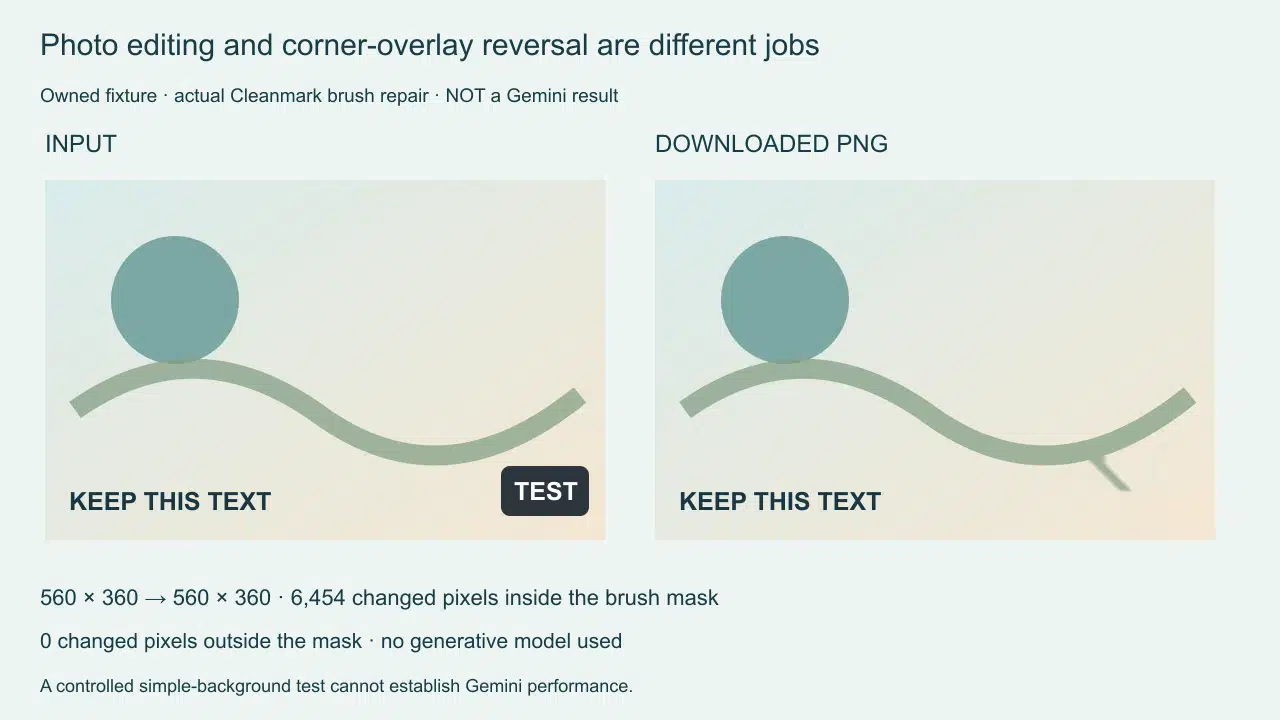
We tested the unchanged image tool with an owned artificial graphic containing a TEST badge beside separate bottom text. The input and downloaded output both measured 560 × 360 pixels. The painted mask contained 9,189 pixels. Comparison of the actual input and output found 6,454 changed pixels inside that mask, zero changed pixels outside it, and zero changed pixels in the separate text region.
That result supports a narrow decision: in this controlled run, a mask kept away from nearby text left that text unchanged. It does not show that a mask crossing letters would preserve them, or that a badge covering a face could be repaired accurately. The test was a generated graphic, not a photographic reconstruction benchmark.
A second owned experiment checked resolution rather than appearance. A 1200 × 120 input remained 1200 × 120 after loading, manual repair and PNG download. A 3000 × 300 input loaded at 2400 × 240 and downloaded at that reduced size. The tool caps the long side before editing. If your requirement is preserving every original pixel dimension, check the input against that cap before starting.
The dimension comparison and the mask comparison answer different questions. A result can keep its width and height while changing pixels in the repaired area. A larger image can lose dimensions before any brush stroke. Neither matching dimensions nor unchanged unpainted pixels proves recovery of the true content beneath a watermark.
These are previously completed first-party browser experiments, reused here to make the free-workflow decision concrete. We did not run a fresh benchmark, compare competitor outputs or measure repair quality across a collection of photographs. Detailed checks are available in our upload-dimension report and local brush workflow report.
How to use the image tool
- Keep an untouched copy and choose an image you own or have permission to edit.
- Open the image tool and upload a PNG, JPG or WebP.
- Paint only the mark. Leave nearby lettering, faces and object edges outside the mask when possible.
- Run repair and inspect the selected region. Stop if it introduces smearing or removes useful detail.
- Download the PNG and compare its dimensions and appearance with the original.
When a free repair is the wrong choice
If the mark covers important detail, request an authorized clean original or export when available. A large painted region gives nearby-pixel repair less useful surrounding information. This page does not establish that the tool can restore lettering, skin texture or a complicated boundary.
For a video with sound you need to keep, the current silent crop export does not satisfy that requirement. For animation, review our GIF format check. Visible pixels and invisible provenance are separate: repairing a visible logo is not proof that hidden signals are gone.
What does “free” cover here?
The current image workflow exposes upload, brush repair and PNG download without account creation or a checkout step. Processing runs in the browser. This is a description of the current tool, not a promise about another service’s pricing or future availability. Use the working controls and the downloaded file to judge whether the output fits your needs.