Remove Watermark from Video
Repair a small visible watermark in your saved video without cropping the frame: choose an MP4 or WebM, set its repair area, then export WebM with audio. This free tool estimates replacement pixels and works best on plain backgrounds.
Have only a link? Obtain a video you own or may edit first. This tool accepts local files, not social links. It cannot recover hidden detail or track a moving mark automatically.
Up to 50 MiB, 60 seconds, and 1280 pixels on the longer side. No upload or account. Browser decoding and recording support are required.
Coordinates are source pixels from the top-left. Include the entire mark inside the box, leaving a clean one-pixel sampling border around it. If it switches positions, use a second box with the corresponding start and end time. Boxes do not follow a moving mark.
Choose a short local clip to begin.
Download repaired videoSame-file test: the mark cleared, the line did not
We made two new six-second landscape videos on 25 October 2026, then selected each local file in this tool, set the repair rectangle, exported and downloaded the WebM. These are owned synthetic fixtures with DEMO lettering and a timer, not downloaded platform videos. Both have a moving gold object away from the mark and an audio tone. One background is flat; the other has a diagonal line running behind the lettering.
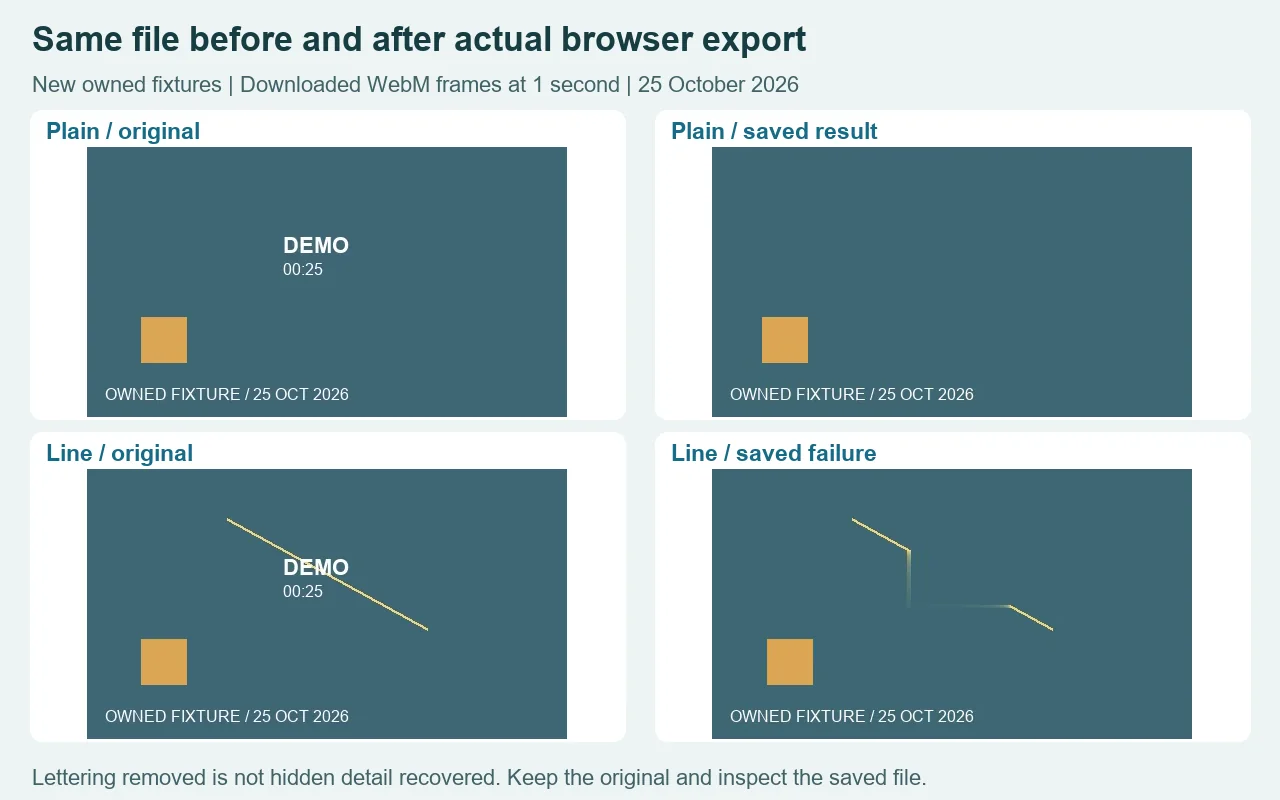
Each source is 480 by 270 pixels, contains 144 video frames at 24 frames per second, and carries a 600 Hz audio tone. We used one rectangle at X 190 and Y 82, width 108 and height 58, active from zero to six seconds. The second zone stayed disabled. These settings belong to this fixture; they are not a universal location for a watermark.
The plain-background export measured 140,493 bytes. We extracted frames at one and four seconds from the file we actually downloaded. They retained the 480 by 270 frame and showed the selected lettering replaced by a plain patch. Keeping the composition matters when the mark is inside the image rather than in a border you can discard. It still does not mean that the covered pixels have been recovered.
The diagonal-line result measured 139,251 bytes, and we kept it too. The lettering became less visible, but the line bent into a smeared rectangular patch. That is an appearance failure even though an export was produced. A clean sampling border is not enough to rebuild a feature that crosses the selected area. If your mark crosses a face, fine text, a wire or another useful edge, this example is a reason to stop and inspect rather than accept a cleaner-looking thumbnail.
Both downloaded files passed a complete decoding check. Each decoded audio stream contained six seconds of nonzero signal. That confirms an audible signal in these samples, not preservation of an original compressed soundtrack or a guarantee of exact timing for every clip. The browser records a new WebM. Check the saved file's sound and the beginning and end of the video, especially when synchronization matters.
The plain and line checks used the same rectangle and workflow, so changing the background was enough to change whether the result was acceptable. We have not turned that pair into a success rate, a ranking against other tools or a claim about all video watermarks. The source clips and the failed output remain available below so you can examine the limitation yourself.
Repeat with the plain source clip and downloaded plain result, then compare the line source with its saved failure. Retain your own original before making a decision. Our earlier offline algorithm images are not used here as substitutes for these newly downloaded browser results.
Set the area, preview, and save
- Choose a short video file you own or have permission to edit. A social-media link is not an input to this tool.
- Find the visible mark in the source preview. Enter its rectangle in source pixels and include a clean sampling border around all the lettering.
- Set when that rectangle needs repair. A second fixed position can use the second zone and its own time range; continuously moving marks are not tracked.
- Inspect several moments. If an important line or texture is smeared, keep the original and stop.
- Keep the tab visible during export, download the WebM, and play the saved file to check the picture, audio and timing.
Can I delete a watermark from a video without cropping?
This tool keeps the frame dimensions and estimates pixels inside your selected area. It is intended for small visible marks over simple backgrounds. It does not run a generative model, recover hidden original detail, remove invisible provenance or validate ownership. No account or checkout is needed for this local workflow.
Limits that change the result
Choose a browser-playable MP4 or WebM up to 50 MiB, 60 seconds and 1280 pixels on the longer side. This tool does not resize the source. Each zone needs a one-pixel border inside the frame and may cover at most 12% of the frame; combined zones may cover at most 20% and must remain separate. Those limits keep the task small, rather than guaranteeing repair quality.
Audio is routed into a new WebM recording, not copied without change. The original MP4 container, codecs, exact timestamps, bitrate, metadata and HDR are not preserved. A source with no sound cannot gain meaningful sound. Hiding the tab cancels export.
When another workflow fits better
If the marked edge is disposable, the separate video edge-crop tool trims the frame and exports silent WebM. For platform-specific positions, see the TikTok saved-file repair example. For a still image, use the image repair tool. This page repairs an existing local video; it does not fetch a file from a link.