Can a video watermark repair preserve a smooth gradient background?
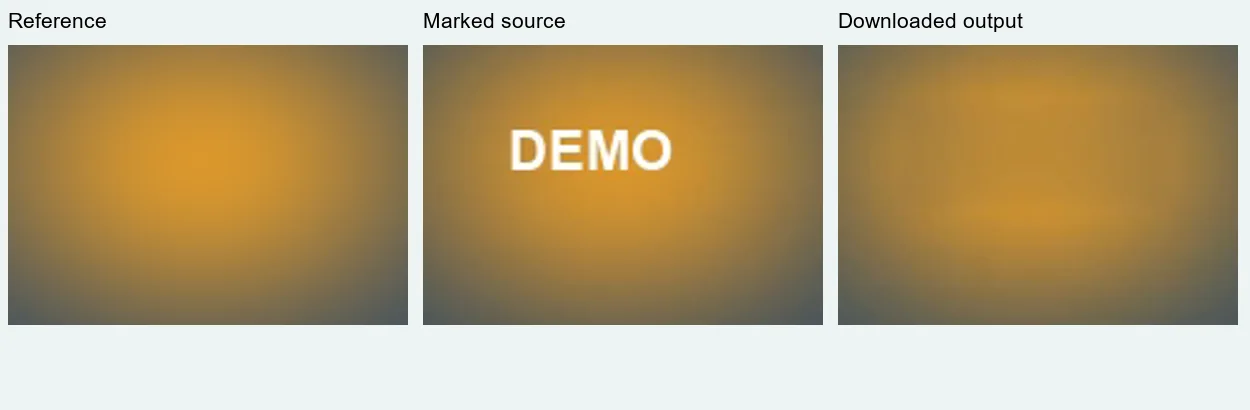
Removing the letters did not preserve the gradient in our test. The downloaded video replaced DEMO with a flatter, darker rectangular area inside an otherwise smooth gold glow. Compare the repaired region with a permitted clean reference when available, and reject a visible patch even if the watermark itself has disappeared.
Open the local video repair toolInspect the reference comparison
This is a controlled test of a static nonlinear color gradient beneath a small fixed overlay. It uses our own generated footage, not a stock preview or a platform download. The tool estimates covered pixels; it does not recover the hidden original.
A smooth glow, one box, and the saved result
On 2 November 2026 we generated a new four-second scene at 480 × 270 pixels and 24 source frames per second. Its background is a static radial gold glow fading into blue. We rendered an unmarked reference and a matching version with white DEMO lettering. Both contain 96 source frames, a visible frame counter outside the repair area, and a generated audio tone. No earlier test export was reused.
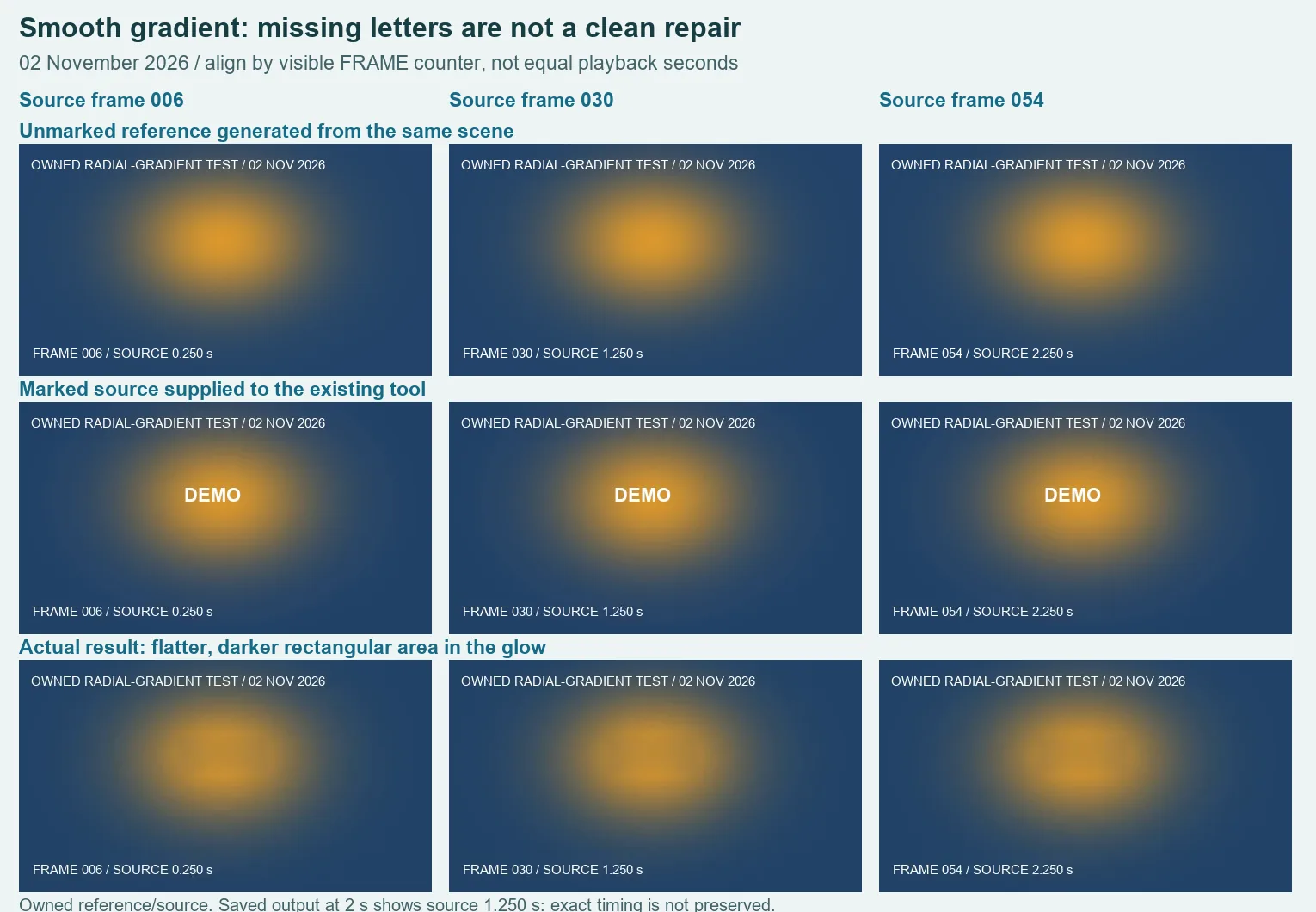
We selected the marked MP4 in the existing production tool. Zone 1 began at X 182, Y 88, with width 108 and height 44 pixels, active from zero to four source seconds. Zone 2 stayed disabled. The box covered the lettering and part of the brightest area of the glow. These coordinates describe the downloadable fixture, rather than a preset for another video.
The actual downloaded WebM measured 194,620 bytes. In the sample at saved playback time two seconds, the counter reads FRAME 030 / SOURCE 1.250 s. We compared it with generated reference frame 30 and the corresponding decoded marked-source frame. The lettering is absent, but the center of the glow is flatter and darker within a rectangular area. The reference has a smoother rounded transition. Clearing the text therefore failed our gradient-preservation check.
The samples at saved playback times one and three seconds show source frames 6 and 54. They also show the changed central region. The underlying gradient does not move in this fixture, so those samples are not independent examples of different backgrounds. They check the same repair at different source moments. We have not turned them into a success rate or a claim that every gradient will fail.
The reference makes the distinction visible: the gold background already existed beneath the overlaid letters, but the repair did not recreate its original shape. A background can be free of hard edges and still contain useful color variation. There is no need for a face, a line or camera movement for a patch to become visible. That is the separate acceptance condition isolated here.
| File | Bytes | Decoded audio | Purpose |
|---|---|---|---|
| Unmarked reference | 62,996 | 4.010667 s | Known original glow |
| Marked source | 63,356 | 4.010667 s | Actual input |
| Downloaded WebM | 194,620 | 4.8 s | Retained gradient-preservation failure |
All three files decoded completely, and the extracted pictures retained 480 × 270 dimensions. Decoded audio duration is the mono sample count divided by 48,000 samples per second. Each file contained nonzero audio. The result's longer audio and its visible source counters mean it must not be described as an exact four-second timing copy. These checks do not prove lossless sound or synchronization.
Download the owned clean reference, marked source and actual failed result. The gradient formula and rectangle settings, visual alignment notes and file measurements and hashes identify this run. We used visual comparison, not a pixel-error score, and did not test competing tools on this input.
Inspect the color transition around the whole box
- Keep your permitted original. In the manual video tool, identify whether the mark sits over a glow, shadow or another gradual color transition.
- Set a tight rectangle with the required clean sampling border. Do not stretch the selection across useful background merely to make the lettering easier to include.
- Inspect the interior and every edge of the repaired region. Look for a flattened highlight, a dark block or an abrupt color change. Missing text alone is not enough.
- Export with the tab visible, download, and play the saved file. Check its timing and sound separately. Use an authorized clean reference if you have one; equal playback seconds may not represent equal source moments.
A gradient needs its own acceptance check
A small box is a supported input, not a guarantee of an invisible repair. This controlled radial glow is not every possible gradient, and the retained failure does not establish an outcome for your file. If the result damages a transition you need, keep the original or use your authorized clean source.
The general video comparison tests a plain background and a static crossing line. The moving-background test checks a stripe passing through a stationary repair. Here the scene stays still: the question is whether a smooth nonlinear color transition survives inside the rectangle. This page does not add a downloader, automatic tracking, or a generative reconstruction feature.