Can a fixed video watermark be removed when the background moves behind it?
The lettering can disappear while the moving background is still damaged. In our saved-file test, a fixed repair box cleared DEMO but deformed the gold stripe passing behind it. Judge that crossing against an unmarked reference when you have one; a clean-looking frame before the crossing is not enough to accept the whole video.
Open the existing local repair tool Inspect the aligned reference test
This is a small-region repair test using a video we generated and own. The tool estimates pixels from a rectangle's border. It does not recover the hidden original scene, track an object automatically, or guarantee unchanged source timing.
A moving stripe, a stationary overlay, one actual export
On 1 November 2026 we generated a new four-second scene at 480 × 270 pixels and 24 source frames per second. A gold vertical stripe moves from left to right. We rendered the same 96-frame sequence twice: an unmarked reference, then a source with fixed white DEMO lettering over the crossing path. A frame counter and source timer remain outside the repair box. The audio is a generated tone, not a third-party recording.
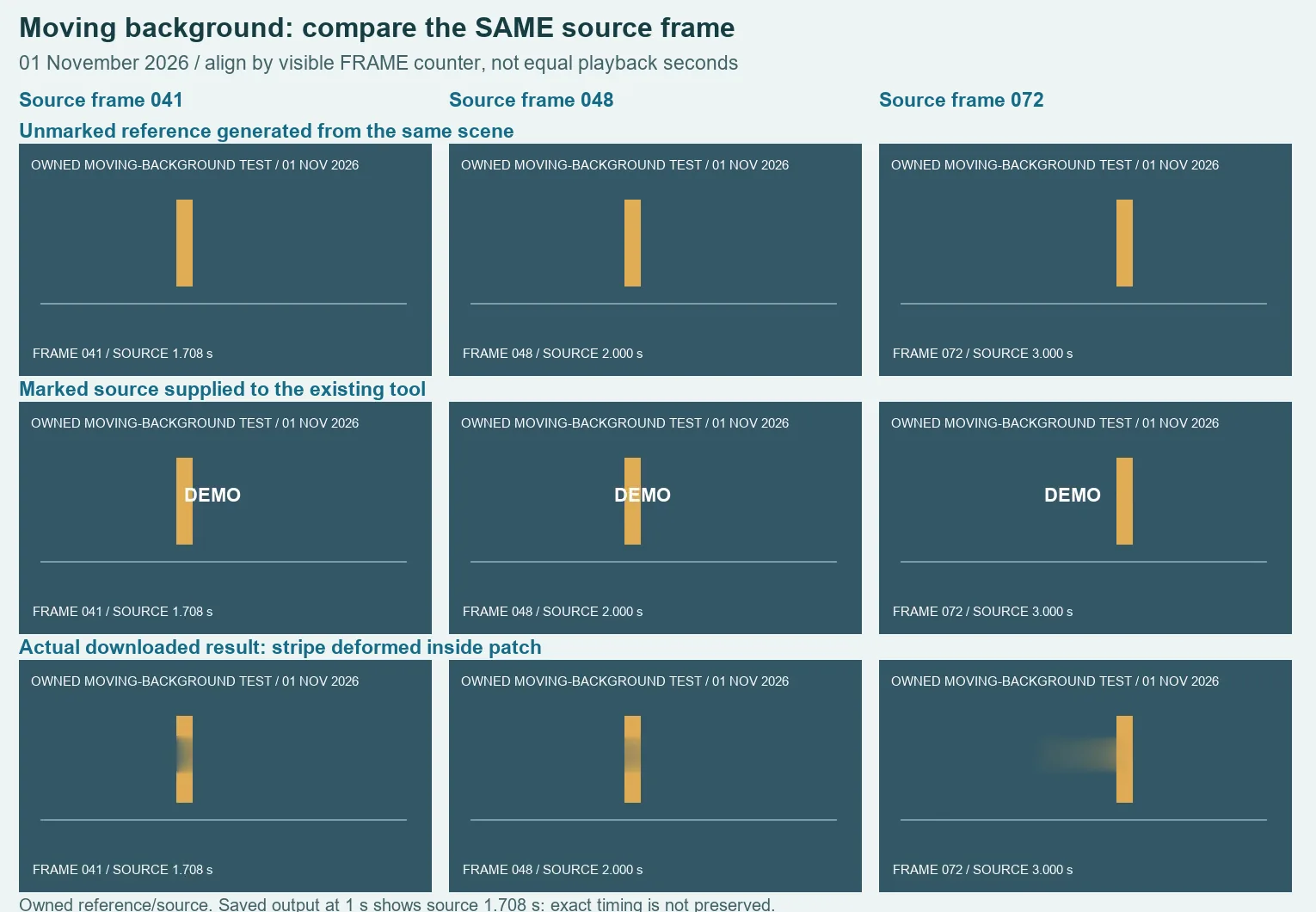
We selected the marked MP4 in the existing production tool and used one rectangle at X 182, Y 88, width 108 and height 44 pixels, active from zero to four source seconds. Zone 2 stayed disabled. This box covered the lettering but also intercepted the moving stripe. We exported once and downloaded a 147,345-byte WebM. These settings describe this fixture, not a universal watermark location.
At saved playback time one second, the visible counter read FRAME 041 / SOURCE 1.708 s. We therefore compared that picture with generated reference frame 41 and the decoded marked-source frame 41, rather than comparing it with reference playback time one second. The reference stripe was solid. In the result, the stripe's section inside the repair rectangle was darkened and softened; the lettering had gone, but the moving feature had not been preserved.
The sample at playback time two seconds showed FRAME 048 / SOURCE 2.000 s. The matching reference again contained a solid stripe through the selected region. The downloaded output showed a faded central segment. At playback time three seconds, FRAME 072 / SOURCE 3.000 s aligned with reference frame 72; the result had a broad horizontal smear extending leftward from the stripe inside the patch. We retained all three aligned observations instead of selecting only an easy frame with an empty background.
Additional output samples at playback 0.25 and 3.7 seconds showed source frames 0 and 89, with the stripe outside the box and the selected lettering absent. Those pictures alone could make the repair look acceptable. They do not cancel the damage during the crossing. The first sample's source time also shows why neither a successful export message nor matching-looking total length proves exact video timing.
| File | Bytes | Decoded audio duration | Purpose |
|---|---|---|---|
| Unmarked reference | 62,767 | 4.010667 seconds | Known scene before adding DEMO |
| Marked source | 66,156 | 4.010667 seconds | Actual input to the tool |
| Downloaded result | 147,345 | 3.96 seconds | Retained stripe-preservation failure |
All three files decoded completely, and extracted pictures retained 480 × 270 dimensions. Audio duration was calculated as the decoded mono sample count divided by 48,000 samples per second. Nonzero audio was present. These checks do not prove lossless sound, exact synchronization or original encoding. We used visual frame-counter alignment and did not calculate a pixel-error score or a general success rate.
Download the unmarked reference video, marked source and actual failed result. The fixture and rectangle settings, alignment notes and measurements and hashes identify this run. The clean reference exists because we generated the scene; it is not something this remover recovered.
Check the whole crossing, not just a clean thumbnail
- Keep your permitted original file. Identify whether the background under a stationary mark changes during the clip.
- In the local manual tool, set a small region around the mark and inspect moments where an edge or object enters and leaves it.
- Export with the tab visible, then download and play the saved file. Look for a softened edge, missing segment or new rectangular smear when the background crosses the patch.
- If you have an authorized clean reference, compare the same source moment. Use a visible frame counter or other reliable scene evidence; equal playback seconds may not align.
- Reject a result that damages a feature you need. Prefer the authorized clean source when available rather than treating missing lettering as proof of restored footage.
A stationary watermark is not a stationary scene
A fixed rectangle avoids the separate problem of following a moving overlay. It does not make the hidden scene constant or reconstruct a moving shape. Our controlled stripe is simpler than a face, fine texture or camera movement, and this single retained failure does not establish every possible outcome. The existing tool's small-zone limits still apply.
The general video page compares plain and static-line backgrounds. For two simultaneous marks with wanted content between them, use the separate-box comparison. For a mark that appears only during part of a clip, see the source-time window test. This page tests the different problem of background motion passing through one stationary repair region.