Photo export checks · October 17, 2026
Watermarks on Photos: Check the Small Export, Not Just the Original
Check watermarks on photos at the size you will actually share. A mark that is easy to see on a large master can become tiny when the whole image is reduced. Keep an unmarked master, export a separate marked copy, and inspect the smallest version before publishing. This page tests that export problem; it does not promise a watermark that nobody can remove.
A smaller file can still contain a much smaller mark
When the picture and its visible label are resized together, the label gets less space too. A clean-looking large preview therefore does not settle how the exported thumbnail will look. Background matters: pale letters over a plain dark area and the same letters over fine light lines do not present the same visual contrast.
There is no universal font size or opacity recommendation in this test. The result depends on the image, placement and final display. The useful check is the actual saved copy, not a promise that one setting works for every photograph.
Our controlled export test
We made two original schematic images, each 1200 × 800 pixels. Both used the same mountain-shaped drawing and an artificial CLEANMARK TEST label near the lower-right corner. One background stayed plain beneath the label. The other added crossing light and dark lines. These are drawings we created, not customer photographs, stock previews or samples from a social network.
We saved each marked image at 1200 × 800, 600 × 400 and 300 × 200 pixels using Pillow's Lanczos resampling. We also saved an unmarked control at every matching size. Comparing each marked file with its paired control lets us locate the pixels changed by the mark after that particular export. We did not run a watermark remover, OCR or a social-platform upload.
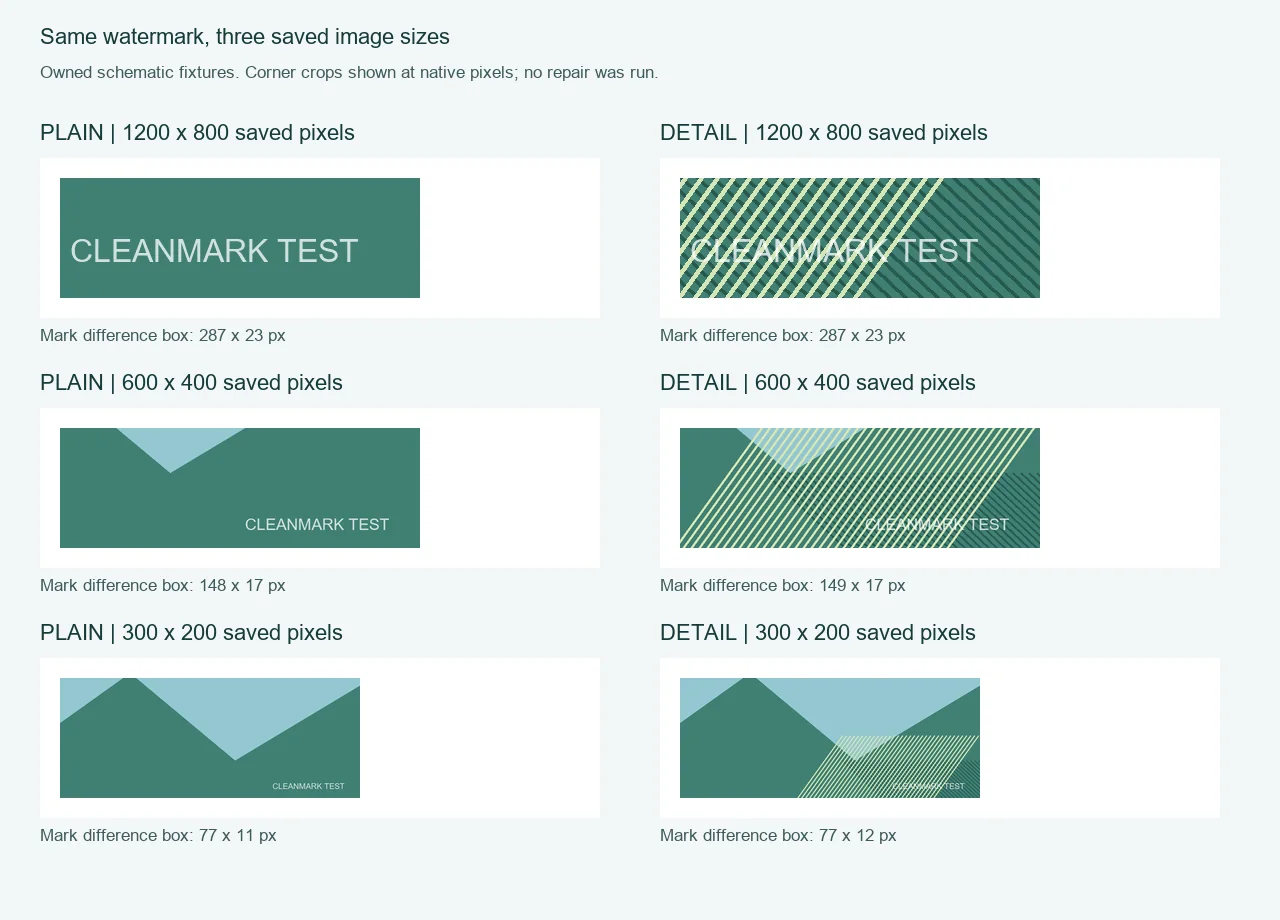
Original test board. Corner crops are placed at their native pixel size inside the board; smaller crops are padded, not enlarged. The webpage scales the complete board to fit your screen.
| Saved image | Plain: changed-area box | Lined: changed-area box |
|---|---|---|
| 1200 × 800 | 287 × 23 px | 287 × 23 px |
| 600 × 400 | 148 × 17 px | 149 × 17 px |
| 300 × 200 | 77 × 11 px | 77 × 12 px |
The box is the smallest rectangle enclosing any nonzero RGB difference between the marked export and its clean control. It includes faint resampling fringes, so its height is not a measured letter height. That is why the smaller boxes do not follow a perfectly neat division of the original dimensions. The plain and lined copies can also have slightly different bounds even though the input label was identical.
At the smallest export, the mark still changed pixels in both backgrounds: 657 pixels differed from the plain control, and 709 differed from the lined control. That establishes that the label had not completely disappeared from these files. It does not establish that a person could read it comfortably. Counting changed pixels is not a readability score.
This is the distinction our comparison makes useful: presence and readability are separate checks. In the original drawing, the changed area was 287 pixels wide; in the smallest plain export it was 77 pixels wide. A mark can survive as a small trace while losing the space that made its wording convenient to read. Inspect the copy at normal size instead of treating a surviving trace as a successful watermark.
We kept the paired controls because the label alone is not the entire measurement. Looking only for white pixels would confuse the watermark with the light lines in the detailed background. The marked-versus-clean comparison isolates the export difference in this controlled setup. For a real photo without a clean reference, this exact measurement would not be available.
These six exports do not measure theft prevention, removal resistance, legal ownership, hidden provenance or another application's behavior. Nor do they prove a minimum size for every watermark. They show one reproducible way to check what happened to a known visible label as its saved image became smaller.
Use the export you intend to deliver
- Keep the unmarked master separate from the marked sharing copy.
- Save a copy at the intended delivery dimensions. If you also need a thumbnail, export that separately.
- Open the saved copy at normal viewing size. Check the lettering against both plain and busy parts of the picture.
- If the mark becomes inconvenient to read, change it in the source design and export again. Do not overwrite the clean master.
- After publishing through another service, inspect its displayed result as a separate check. Our local export test did not test that service.
If your own mark is already flattened into the only copy
Cleanmark's image brush can attempt a nearby-pixel fill on a small selected visible mark in an image you own or have permission to edit. It does not edit a layered project or reconstruct the original content hidden behind a label. A broad mark over detailed content may leave a patch. Recovering a clean source is a different task from repainting a flattened copy.
For an already-saved camera label, use the separate original-copy, crop or brush decision. If your concern is the dimensions of a repaired download, the pixel-dimensions test covers that export boundary. Neither page turns the visibility test above into a promise of perfect removal.
The stopping point: judge this marked sharing copy at its intended size. A mark that remains in the pixels can still be hard to read; a mark that looks clear does not, by itself, establish ownership or make the file impossible to alter.