Will watermark repair keep a portrait video's orientation?
Both saved results stayed upright in our portrait-video test, including an input whose encoded pixels were landscape with a rotation matrix. TOP stayed above LEFT and the four colored corners kept their positions. The two actual WebM downloads were 270 × 480 pixels. This answers the orientation question for these files in this browser, not for every phone or player.
Open the video repair toolSee the actual files
Check the picture you download, not just its width, height or rotation tag. A missing rotation instruction can be correct when the saved pixels are already upright.
Two ways to store the same upright composition
On 4 November 2026 we generated a new owned animation with TOP and LEFT labels, red and blue upper corners, green and gold lower corners, a moving gold disk and a source-frame counter. DEMO sits on an isolated flat patch below the disk. There are 72 generated source frames at 24 frames per second, three seconds of video, and a generated 700 Hz tone. No platform footage or stock preview was used.
The first MP4 stores portrait pixels directly: 270 × 480, with no rotation matrix reported in our inspection. It measured 44,660 bytes. For the second input we rotated those pixels clockwise into a 480 × 270 encoded frame, then stored a verified 90-degree display matrix that returned the decoded composition upright. That input measured 45,287 bytes. These are separate encodes of the same artwork, not pixel-identical videos.
We checked both encoded and display-corrected frames before testing. The tagged input really did contain landscape pixels and the rotation matrix; it was not merely a portrait file with a different name. An initial legacy metadata command failed to store that matrix in our installed build. We replaced that preparation step with an explicit display-rotation operation and verified the resulting file before selecting it in the browser. That preparation retry is not a remover failure.
We selected each local MP4 in the unchanged production repair tool. Both loaded at 270 × 480 and three seconds, and the visible TOP, LEFT and corner layout was upright. The preview canvas also measured 270 × 480. For each run we set Zone 1 to X 87, Y 286, width 78 and height 34, from zero to three seconds; Zone 2 stayed disabled. The rectangle uses the displayed portrait coordinate system. It covers DEMO without touching the orientation labels.
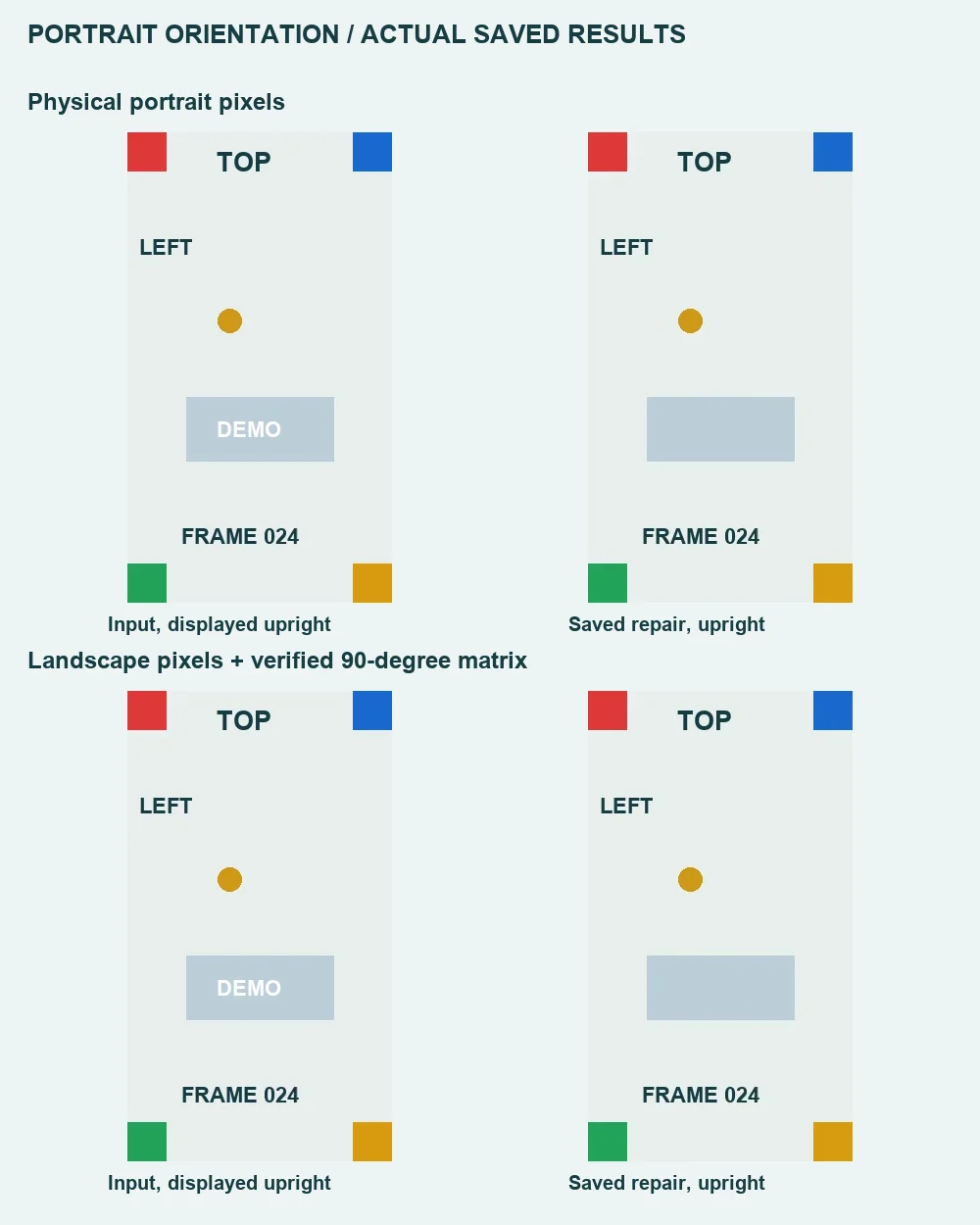
| Input | Encoded input | Browser display | Saved WebM | Saved bytes |
|---|---|---|---|---|
| Physical portrait | 270 × 480; no matrix reported | 270 × 480; upright | 270 × 480; upright | 85,567 |
| Rotated-pixel control | 480 × 270; 90-degree matrix | 270 × 480; upright | 270 × 480; upright | 85,077 |
We downloaded each result separately and decoded the entire saved file. Both passed. Frames extracted at saved playback times zero, one and two seconds were 270 × 480, with TOP above LEFT and red/blue/green/gold in the expected corners. In the displayed one-second pairs the counter reads FRAME 024 in source and output, so that visual comparison is aligned by the artwork, not just assumed from equal timestamps. DEMO is absent in these inspected result frames.
Neither saved WebM reported the input MP4 rotation matrix in our inspection. That did not make the picture sideways: the downloaded pixels themselves were portrait and upright. The tagged source's width and height swapped during this path, but 480 × 270 and 270 × 480 both contain 129,600 pixels. This observation is not a claim of lossless quality; both outputs are newly encoded recordings.
Sound was checked separately. Each input decoded to 144,384 mono audio samples at 48,000 samples per second, or 3.008 seconds. Each output decoded to 144,000 samples at the same rate, or 3.000 seconds, with nonzero signal. Those durations are sample count divided by sample rate. They establish recorded signal in these fixtures, not bit-for-bit soundtrack preservation, perfect synchronization or an unchanged timeline.
Download the physical portrait source and its actual repaired result, or the verified rotation-matrix source and its actual repaired result. The measurement record includes file hashes, dimensions, matrix observations, sampled corner colors, complete-decode results and audio readings. The physical-input browser record and rotation-input browser record retain loaded dimensions and rectangle settings. These are bounded examples, not a device-compatibility survey or an all-frame quality score.
Before accepting a portrait repair
- Keep an authorized original. Check its visible upright arrangement before selecting a repair rectangle; encoded width alone may describe a different storage arrangement.
- In the local video tool, use the loaded coordinate system and inspect an unmistakable top/left feature. A box chosen for sideways storage pixels is not automatically the correct displayed box.
- Download the output and play it in the viewer you intend to use. Check labels, faces, corners, sound and the beginning and end. An upright preview alone does not certify the saved file.
- If the result is sideways, reject it rather than treating missing metadata as proof of success or failure. Preserve the original and prepare a correctly oriented permitted copy in an editor before trying another repair.
Orientation is a separate acceptance check
The JPEG orientation experiment concerns a still image and EXIF interpretation, not a video's display matrix or recorder output. Our WebM transparency test retained a different failure: changed partial alpha. Here the new result is upright portrait composition from two verified storage arrangements. It does not establish invisible-mark removal, hidden-detail recovery or support for every rotation value.