Does video watermark repair preserve transparency in a WebM?
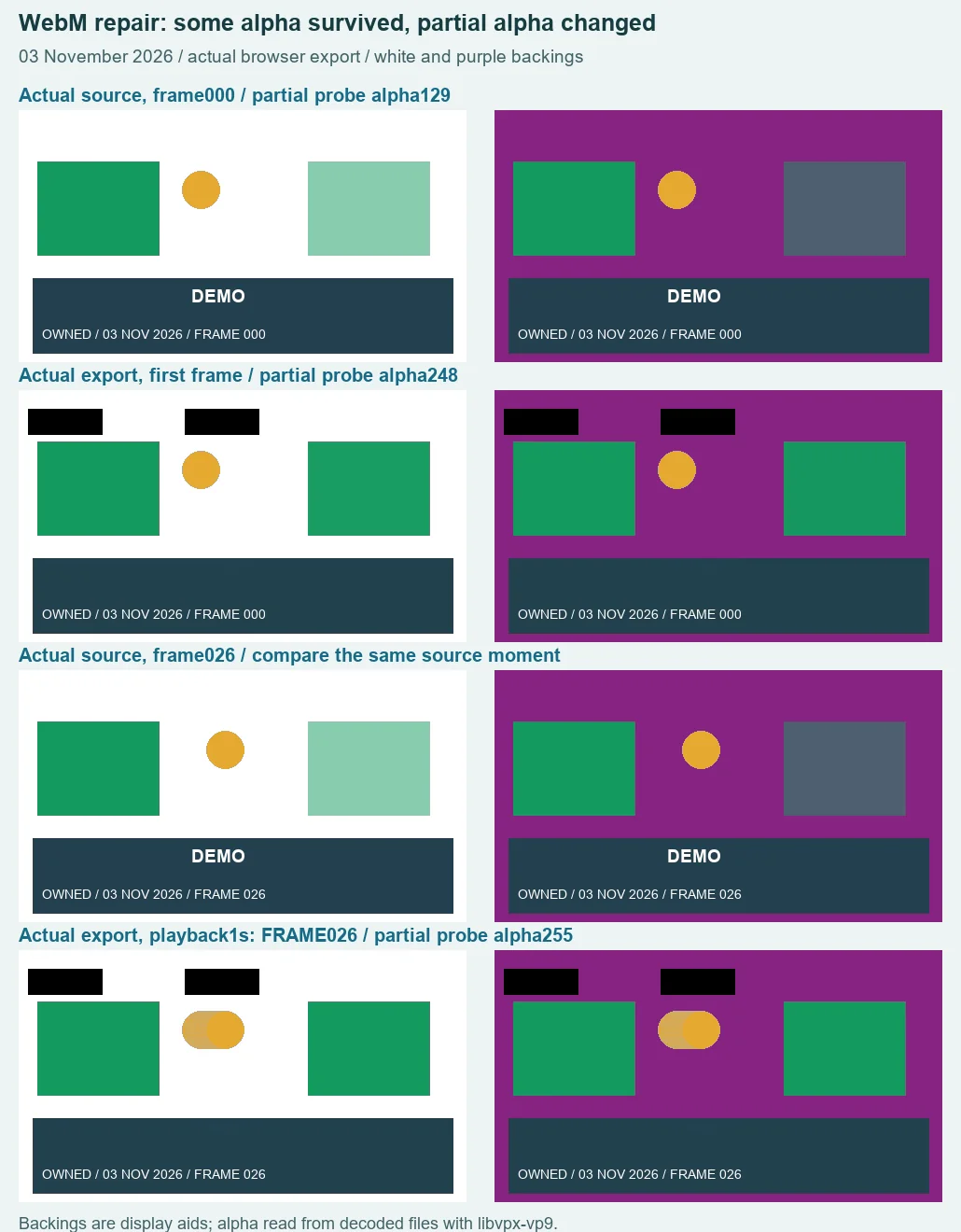
Some transparency survived our export, but the original alpha values did not. In our actual browser test, an untouched partly transparent patch changed from alpha 129 in the source to 248 in the first saved frame and 255 in a later sample. Empty space still contained transparent pixels. The saved file also acquired unwanted black rectangles, so this result failed our transparency-preservation check.
Open the existing video toolInspect the downloaded failure
This is a new controlled test with footage we generated and own. It is not a promise of alpha-preserving export, background removal, or recovery of hidden detail. Keep an original when compositing transparency matters.
First verify the input, then measure the actual output
On 3 November 2026 we made a two-second VP9 WebM at 480 × 270 pixels and 24 source frames per second. It has 48 source frames, transparent surrounding space, an opaque green patch, a partly transparent green patch, a moving gold circle, and an opaque lower strip with DEMO and a frame counter. There is no audio by design. A white-flattened control uses the same artwork; an unmarked reference is generated separately from the owned recipe, not recovered by the remover.
The marked source measured 29,370 bytes. With the explicit libvpx-vp9 decoder, its first frame contained 65,294 fully transparent pixels, 13,231 partly transparent pixels and 51,075 opaque pixels. These sum to 129,600, or 480 × 270. The partly transparent patch at X 350, Y 80 had alpha 129. Our independent browser file probe then loaded the same local file, drew its ready first frame to a fresh canvas and obtained the same alpha counts and probe value. White and purple display backings showed through the surrounding space and the partly transparent patch.
That input check mattered. The default decode path in this installed FFmpeg build produced a fully opaque RGBA frame from the exact same transparent-source bytes. Explicit libvpx-vp9 exposed the alpha; merely asking for RGBA output did not. The white-flattened control, 28,510 bytes, stayed opaque under both paths. Those are input-decoding observations, not repaired results or a claim about every decoder version.
We selected the marked source in the unchanged production video tool. After its default preview appeared, we entered Zone 1 X 178, Y 184, width 94 and height 34, active from zero to two source seconds; Zone 2 stayed disabled. The final box covered DEMO on the opaque lower strip, away from the green patches. We changed the fields in X, Y, width, height order and then exported and downloaded. These settings and that preview sequence describe this run, not a universal preset.
The saved WebM measured 29,801 bytes. Its first decoded frame had 58,375 fully transparent pixels, 18,839 partly transparent pixels and 52,386 opaque pixels. At the same X 350, Y 80 probe, alpha was now 248. A separate browser probe of the downloaded file agreed on that alpha value and those counts. At saved playback time one second, the visible source counter read FRAME 026; the matching source frame still had a see-through patch, but the output probe was fully opaque at alpha 255.
DEMO was absent in the inspected output frames. However, there were also two black rectangular areas near the top of the saved image, outside the final lower-strip repair box. The moving circle left an extra visible trail in the later sample. We kept these defects in the comparison. We did not isolate their cause or change the tool to manufacture a cleaner result. The earlier preview positions are part of the recorded workflow, so this run must not be presented as an isolated codec experiment.
| File and sample | Alpha | Observation |
|---|---|---|
| Marked source, first frame | 129 | Partly transparent |
| Downloaded output, first frame | 248 | Much less transparent |
| Downloaded output, playback 1 second / FRAME 026 | 255 | Fully opaque |
The source, control, reference and downloaded result passed complete decoding. The output's two inspected samples retained 480 × 270 dimensions. Its decoded audio stream contained 74,880 mono samples at 48,000 per second, or 1.56 seconds, all zero. That is a silent recorded stream, not recovered sound. The browser played the saved file to its 1.939-second end. Do not describe this as an exact two-second timing copy or as preservation of an original soundtrack.
Download the actual marked source, opaque-white control, generated unmarked reference and retained browser-export failure. The input measurements and hashes, output readings and rectangle, and browser input probe / output probe distinguish generation, decoding and actual browser editing. The alpha counts concern inspected frames, not an all-frame success rate.
Check transparency separately from missing lettering
- Preserve your permitted source. Verify actual alpha with a decode path that can read it, and inspect the frame over two contrasting backings. White pixels are not transparent pixels.
- If using the manual video tool, keep the repair small and inspect wanted regions outside the rectangle too. A supported input format does not certify unchanged alpha.
- Download and inspect the separate saved output. Check partly transparent areas, empty space, unwanted opaque patches and motion. Do not stop when the letters disappear.
- Reject the output if transparency needed for compositing has changed. Use an authorized clean source or an editing workflow whose exported alpha you have verified.
A different output from the still-image tests
The PNG alpha experiment measured a still-image brush export. The GIF boundary test concerned an unsupported animated input and still-frame conversions. Neither establishes WebM recorder behavior. Here, the new evidence is the marked video accepted by the browser, the actual downloaded repair, and changed alpha outside the final selected area. This single retained failure does not establish every possible WebM outcome.