Can I Remove a Video Watermark Without Erasing Subtitles?
Yes, when the visible watermark and the subtitles occupy separate areas: repair only the watermark, and keep every caption outside the repair box. In our saved-file test, a tight box removed DEMO while KEEP THIS CAPTION remained readable. Making that same box taller erased most of the caption. If the two overlap, this local repair cannot separate their hidden pixels.
Open the local video repair tool See the actual saved results
For a video file you own or may edit, with subtitles already visible in its picture. This is a caption-preservation test, not a subtitle remover or a link downloader.
One file, two boxes, opposite subtitle outcomes
On 29 October 2026, we created a new four-second video specifically for this question. It contains a small DEMO label above the caption KEEP THIS CAPTION, a moving gold square away from both, and a generated audio tone. The picture is 480 × 270 pixels. All of the artwork and lettering are our own; no platform download or other person's footage was used.
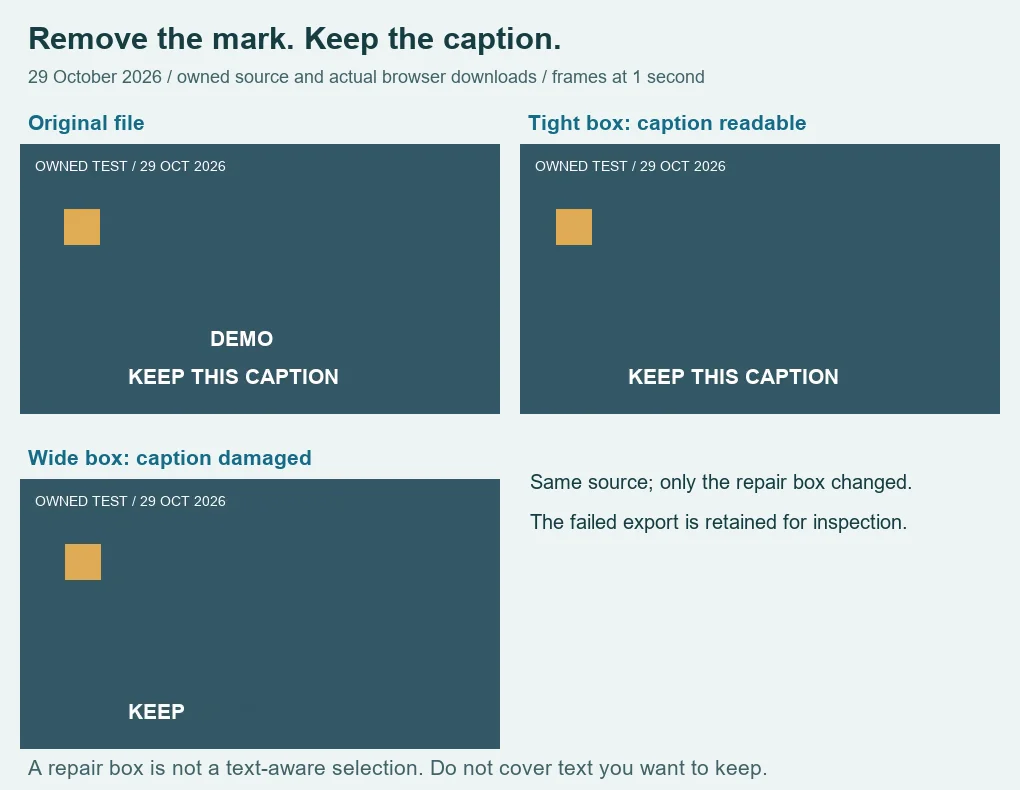
We selected that same MP4 in the existing Cleanmark video tool for both runs. Zone 2 stayed off. The tight rectangle began at X 182, Y 178, with width 88 and height 32 pixels, active from zero to four seconds. Its bottom edge stopped above the caption. After exporting and downloading the file, DEMO was gone and the complete caption was legible in the extracted frames at one and three seconds.
The second run used X 168, Y 176, width 160 and height 74 pixels over the same time range. That box included the middle and right side of the caption as well as the watermark. The downloaded result left only KEEP readable. The wider selection did not give the tool a better understanding of which words mattered. It simply asked the repair to replace more of the picture.
| Run | Saved file | Picture | Caption observation | Decoded audio duration |
|---|---|---|---|---|
| Original | 46,850 bytes / MP4 | 480 × 270 | KEEP THIS CAPTION visible | 4.0106666667 s |
| Tight box | 90,637 bytes / WebM | 480 × 270 | Complete caption readable | 4.14 s |
| Wide box — failed | 86,560 bytes / WebM | 480 × 270 | Only KEEP readable | 3.96 s |
All three files passed a full decoding check. The audio durations above come from decoded mono samples divided by 48,000 samples per second. We include the different durations because a successful picture check does not prove exact timing preservation. These results confirm nonzero audio in the saved test files; they do not establish an unchanged soundtrack, lossless encoding, or synchronization for another video.
Replay the test with the original owned MP4, the tight-box saved result, and the wide-box saved failure. The downloadable rectangle settings record both runs, and file measurements include hashes. Changing only the rectangle was enough to turn this caption-preservation check into a failure. That is the result to reproduce, rather than assuming that a larger selection is safer.
Set the box around the unwanted mark, not the whole text band
- Open the saved-video repair tool and choose your permitted local file.
- Scrub through the clip before setting a rectangle. Check where each caption line reaches, including taller letters and captions that change position.
- Draw the repair area tightly around the watermark using the source-pixel coordinates. Leave the tool's required clean sampling border, and keep the wanted lettering outside it.
- Restrict the start and end times to the part that needs repair. A rectangle that is safe for one caption may cover a different line later.
- Preview, export, download, and play the saved result. Inspect the longest caption as well as the first one, then check the audio and the clip's end.
Our coordinates are only for the downloadable fixture. They are not a preset for your file. A watermark at another location needs another selection, and a continuously moving mark will not be followed automatically by this tool.
When the watermark crosses a subtitle, stop
A repair rectangle selects pixels, not an identity such as “watermark” or “dialogue.” When both are inside the box, wanted letters can be replaced too. Shrinking the box may preserve the caption but leave part of the mark. Our separated-label result does not show that overlapping lettering can be recovered.
Keep the original. If you have the editing project or a permitted clean export, use that source to retain the subtitle text instead of accepting a damaged sentence. This test does not recover text hidden under an overlay and does not validate anyone's permission to alter footage.
What this page adds to the general video tool
The general video repair page tests a plain background against a line that crosses a watermark. This page isolates a different acceptance condition: wanted text beside the repair must remain readable. Its source, two newly downloaded exports, exact rectangles, and failed caption are specific to that check.
For a still image with lettering beside a mark, see the separate text-next-to-watermark example. For TikTok positions in a saved file, use the TikTok repair example. This subtitle-preservation page does not claim automatic caption detection, removal of a separate subtitle track, or support for downloading a video from a social link.