Does video watermark repair preserve non-square-pixel display proportions?
In our two-file test, the saved video kept the intended wide composition: a 480×270 input with 2:1 sample aspect ratio became a 960×270 WebM with square pixels. The gold shape stayed close to its decoded display reference, although its measured boundary changed by one pixel. This was not an unchanged file or an exact-timing pass.
Open the local video repair tool
Tested 10 November 2026 with owned synthetic footage and the unchanged browser tool. Check the displayed picture and the actual downloaded file together. Stored width, a missing source tag or a clean preview alone cannot answer this question.
Different stored pixels, the same intended display size
We created a new three-second animation with a small DEMO target, a gold circular shape, TOP and RIGHT landmarks, a moving blue block and a visible source-frame counter. The reference composition is 960 by 270. There are 72 source frames at 24 frames per second and a generated 700 Hz audio tone. The artwork and footage are ours; these are not clips downloaded from a platform.
The square-pixel control stores 960×270 pixels and reports sample aspect ratio 1:1. It measures 67,074 bytes. The anamorphic source stores a horizontally compressed 480×270 picture and reports sample aspect ratio 2:1. It measures 60,854 bytes. Both encoded headers report display aspect ratio 32:9. We inspected those actual headers and decoded every input frame before opening the tool, rather than inferring the aspect ratio from the encoding command or filename.
For an input reference, we separately decoded each file using its reported sample aspect ratio into a 960×270 square-pixel picture. This local normalization is a reference, not a simulated repair result. The two encodes are not pixel-identical: at the sampled source counters, the gold-region boundary measured 110×110 in the square control and 108×111 in the normalized anamorphic input. We therefore compare each actual output to its own decoded source reference.
The browser loaded both at displayed dimensions
We selected the original anamorphic file in the production tool. It reported 960×270 pixels and 3.000 seconds, and the video element also reported videoWidth 960 and videoHeight 270. The preview showed the wide arrangement with the gold shape and TOP/RIGHT landmarks. That is different from treating its stored 480-pixel width as the coordinate space for the repair.
The square control loaded at 960×270 too. For each real run we entered X 104 and Y 84, width 108 and height 42, active from zero to three seconds. Zone 2 stayed disabled. This rectangle covers the small DEMO letters on their flat patch, away from the gold shape and landmarks. Both runs reached Ready, and we downloaded their WebM files separately. Neither export needed an empty-file retry in this pair.
| Input | Stored source / sample aspect | Browser loaded size | Saved size / sample aspect | Saved bytes |
|---|---|---|---|---|
| Anamorphic | 480×270 / 2:1 | 960×270 | 960×270 / 1:1 | 112,153 |
| Square control | 960×270 / 1:1 | 960×270 | 960×270 / 1:1 | 103,233 |
Measure the shape instead of trusting a tag
Both downloaded headers report 960×270 VP9 video, sample aspect ratio 1:1 and display aspect ratio 32:9. The anamorphic output does not need the source's 2:1 sample aspect ratio to remain wide: it now has twice the stored width. Keeping 2:1 on that wider pixel picture would be a different display instruction. We did not count the changed tag alone as a failure or the unchanged display-ratio label alone as a success.
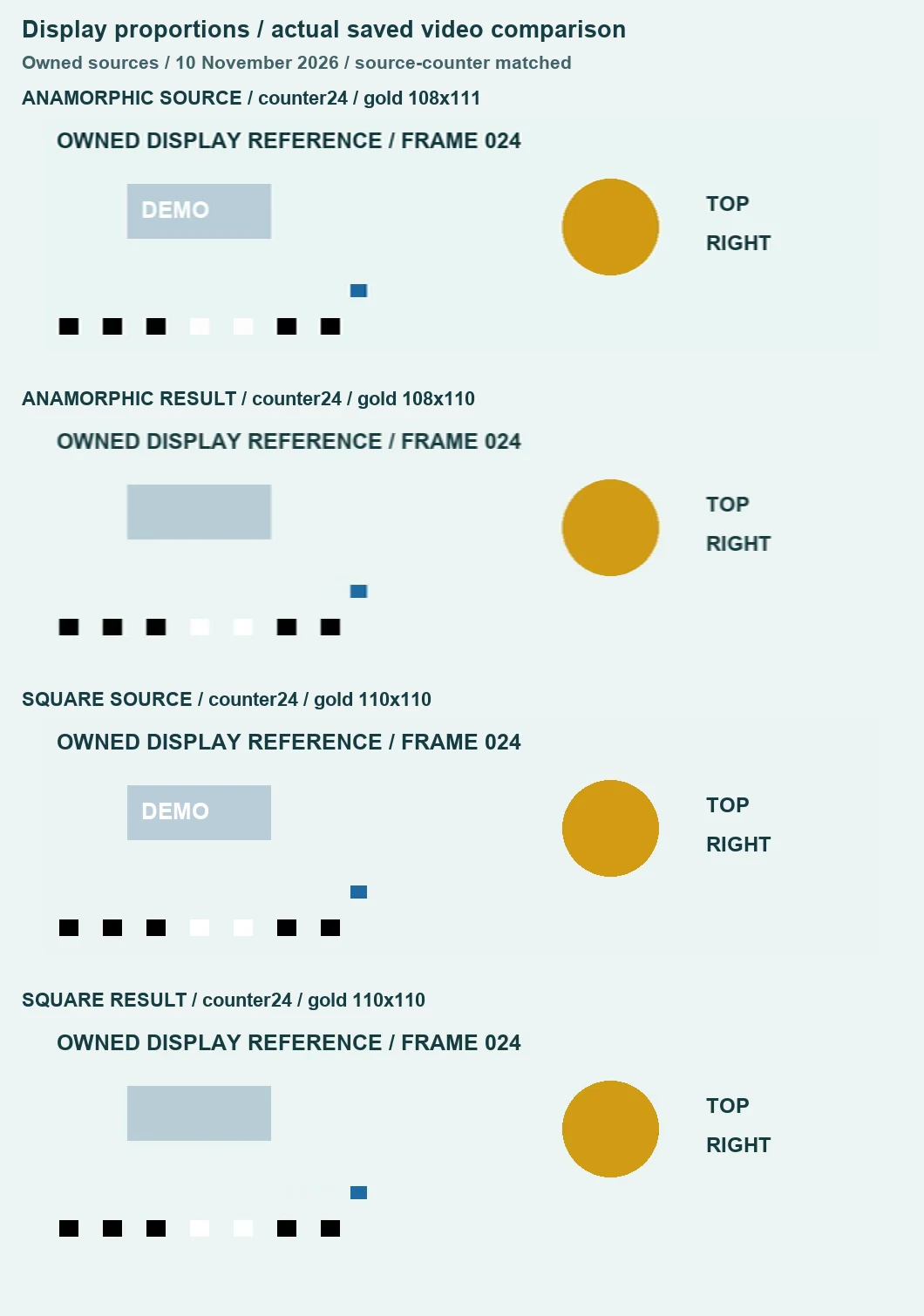
We measured the gold shape outside the repair at four requested source counters: 0, 24, 48 and 71. Within X 560–739 and Y 55–189 of each decoded display picture, the mask requires red above 150, green above 90 and below 190, and blue below 60. Width and height are the inclusive bounds of qualifying pixels; the ratio is width divided by height. These thresholds define this fixture's measurement, not a calibrated perceptual score.
For the anamorphic input, the normalized reference bounds are 108×111, or 108/111 = 0.972972973. The corresponding saved samples measure 108×110, or 108/110 = 0.981818182. We kept that one-pixel boundary difference rather than reporting exact preservation. For the square control, source and saved bounds are both 110×110, ratio 1. These samples show that the source's horizontal compression did not become a half-width saved composition; they do not establish equality of every pixel.
Source counters matter here. The anamorphic saved file contains 57 decoded video frames. Requested counter 48 was absent, so that comparison uses its nearest available counter, 47, and is explicitly recorded that way. Counter 24 appears at saved frame index 18 and presentation time 1.354 seconds. In the square control it appears at index 17 and 0.981 seconds. The pictured comparison uses counter 24 in both, not an assumption that one second or the same frame index means the same source moment.
The timing check did not pass as unchanged
The square saved file has 53 decoded video frames against 72 in its source. The anamorphic saved file has 57. Their last decoded presentation timestamps are 2.949 and 3.317 seconds respectively. Those timestamps are not promises of complete container duration. The anamorphic result's changed spacing is retained in the evidence, even though the wide composition looked right in the sampled frames.
Each input decoded to 144,384 mono audio samples at 48,000 Hz, or 3.008 seconds. The saved anamorphic file contains 141,120 samples per channel, or 2.94 seconds; the saved square control contains 144,000, or 3.000 seconds. Both saved audio streams are stereo Opus with nonzero signal. Complete decoding passed, but these changes do not support a lossless-audio or exact-synchronization claim.
Download the verified anamorphic source and actual anamorphic result, or the square-pixel control and actual control result. The full measurement record preserves headers, hashes, source counters, actual timestamps, geometry readings and audio sample counts. A successful file download is not a guarantee that it meets your delivery requirements.
Which dimensions should I use for the repair box?
Use the dimensions actually loaded by the tool and check the target in its preview. In this run both inputs used a 960×270 coordinate space, although one stored only 480 pixels across. Keep your original, place a small box on the permitted mark, export with the tab visible, then inspect the saved picture, motion and sound. If the geometry or timing fails your requirements, keep the original and reject that result.
Is this the same as a portrait rotation test?
No. The portrait orientation experiment checks a rotation matrix and upright arrangement. This experiment checks sample aspect ratio and displayed proportions. The motion-sampling test covers temporal detail separately. These are bounded observations of owned fixtures in this browser, not compatibility guarantees for every camera, codec, format or player.