Does video watermark repair retain an embedded subtitle track?
Our saved WebM did not retain the embedded subtitle track: a new MP4 with one verified timed-text stream exported with none. Keep the original and its subtitle file if you need captions that remain selectable. A separate control kept words already drawn into the picture, which is a different result.
Open the local video repair tool
This is an actual two-file browser test from 9 November 2026, using our own synthetic footage and caption text. It does not establish what every browser, container or subtitle format will do. The tool's source preview did not expose a text track; we checked the downloaded file separately before reporting the missing saved stream.
One source carried text as a stream; the control carried pixels
We created two four-second, 480 by 270 MP4 files for this experiment. Each contains 96 decoded video frames, a moving gold shape, an individual frame counter and a small DEMO mark on a plain patch. Both carry a 660 Hz tone. None is a downloaded social or stock video. The caption sentences are our own fixture text, not quotations from users.
The 81,093-byte muxed input contains one mov_text subtitle stream with English language metadata and a default disposition. We did not assume that a default flag would make the browser show it. Before the browser run, we actually extracted the stream into SRT and read both cues: KEEP FIRST CUE from 00:00:00,500 to 00:00:01,500, and KEEP SECOND CUE from 00:00:02,000 to 00:00:03,500. The video pixels themselves have no caption letters in that area.
The 85,107-byte control has the same kind of scene, but we drew those words directly into its bottom picture region during the corresponding frame ranges. Its container has no subtitle stream. This control asks whether visible letters outside the repair box survive. It cannot prove retention of selectable text, cue timing metadata or a captions menu.
Two real exports, with the same repair rectangle
We selected each local file in the unchanged production tool, entered X 192 and Y 96, width 91 and height 38, and left that rectangle active from zero to four seconds. Zone 2 stayed off. The rectangle encloses DEMO, well above the caption area. We then used Repair and export WebM and downloaded both outputs. Both runs reached the ready message; no empty-output retry was needed in this pair.
| Input and saved output | Input subtitle streams | Saved subtitle streams | Saved bytes | Decoded video frames |
|---|---|---|---|---|
| Embedded timed text → WebM | 1, extracted and verified | 0 | 151,044 | 89 |
| Burned-in picture words → WebM | 0 | 0 | 167,222 | 91 |
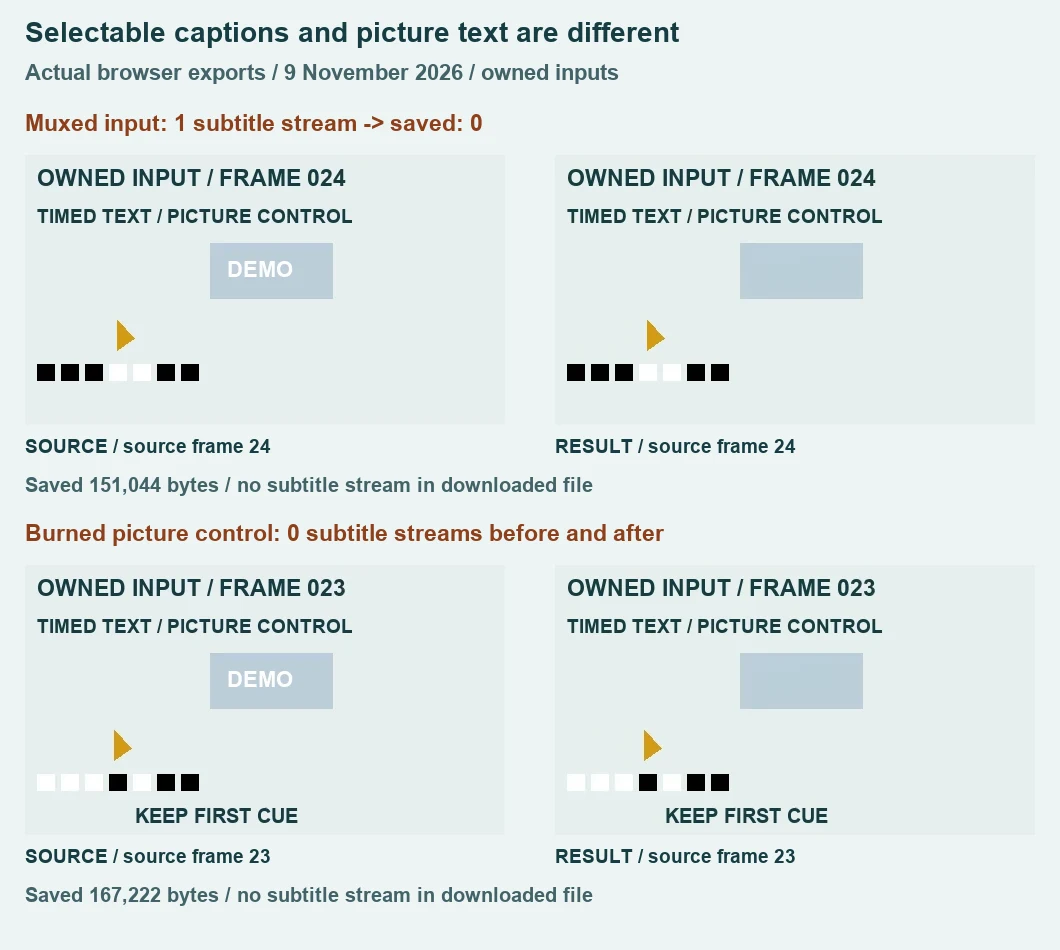
We enumerated the actual downloaded streams and attempted explicit subtitle extraction from each saved file. Neither contained a subtitle stream. The extraction command reported Failed to set value '0:s:0' for option 'map': Invalid argument. That is an observed extraction failure, not an empty caption file counted as a successful export. The original input's two cues remain available in the extracted SRT; the repaired muxed output has no saved subtitle cues to compare against those timings.
The browser's input video element reported an empty textTracks list before the muxed run. We recorded that separately. An absent preview caption alone would not have proved that a downloaded file had lost its stream. Here the saved-container enumeration and failed explicit extraction provide that second check. We did not inject a caption control, add an external track to the player or burn the muxed text into its picture to make the test pass.
What the actual picture comparison shows
For the muxed result we matched source counters 24 and 60 to saved frames 22 and 54, at saved presentation times 0.993 and 2.512 seconds. Both source and saved picture regions are blank where the separate cue would be rendered by a supporting player. This picture evidence cannot demonstrate selectable captions; that conclusion comes from the stream checks above.
For the burned-in control, source counter 24 was not present in the saved frame sequence. We retained the nearest available counter, 23, rather than calling an adjacent output frame the same instant. The matching saved frame is index 21 at 1.022 seconds. Both images visibly read KEEP FIRST CUE. Source counter 60 is present at saved index 55 and 2.522 seconds, where KEEP SECOND CUE remains visible. The small mark above the text is replaced by a plain patch in these frames.
We also measured the caption rectangle, X 100 through 389 and Y 237 through 267, against the corresponding decoded input counter. Its mean absolute RGB component difference was 1.0212829069 for the first burned-in comparison and 1.0406377456 for the second. The calculation is sum of absolute output-minus-input RGB components divided by 31 × 290 × 3. These readings describe encoded picture differences in that rectangle; they are not OCR accuracy, a word-recognition score or evidence of unchanged typography in every frame.
Both outputs passed a complete decoding check at 480 by 270. The saved audio was one stereo Opus stream with 192,960 decoded samples per channel at 48,000 Hz, or 4.02 seconds, and contained nonzero signal. The inputs each had 192,512 decoded mono samples at 48,000 Hz, or 4.0106666667 seconds. Along with the changed video frame counts, these measurements are reasons not to call this an unchanged remux, lossless soundtrack or exact timing preservation.
Inspect the muxed source, its actual saved output and extracted original cues. The separate burned-in control and its downloaded result show the picture-text case. Full counters, stream metadata, hashes and measurements are in the test record. These are the files behind this page, not reconstructed result images.
What should I keep before repairing a captioned clip?
Keep the original video and any original subtitle file. Check whether your captions are selectable text or already part of the picture, then inspect the downloaded result in a player that supports the required tracks. For a deliverable that must retain selectable captions, this run does not qualify. Use an editing workflow that can explicitly preserve or reattach your authorized original cues and verify the final timings; this tool provides no subtitle-stream export control.
Can this test answer the other caption question?
Wanted letters beside a repair box are covered by the separate burned-in subtitle preservation test. Independently selectable soundtracks are covered by the alternate audio track test. This page isolates timed-text streams. None of these results establishes that invisible provenance, covered original detail or every container feature can be retained.