Does video watermark repair leave combing in interlaced footage?
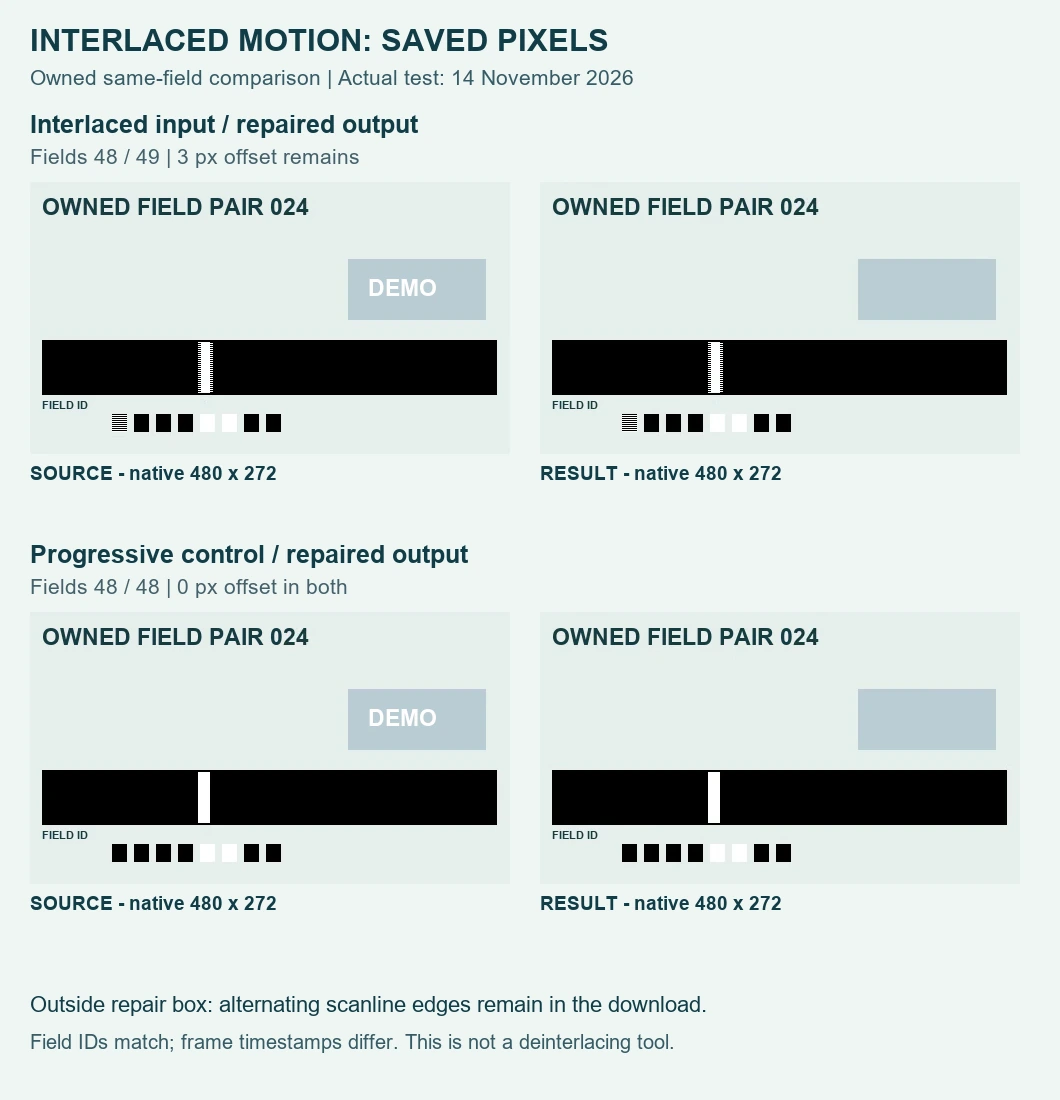
Yes, in this actual test: the saved repair kept the interlaced source’s alternating-row motion edges. The moving stripe still had a three-pixel offset between even and odd rows outside the repair box. The progressive control kept a zero-pixel offset. A successful download did not turn this interlaced picture into clean progressive motion.
Open the local video repair tool
Use this as a saved-file acceptance check for footage you own or are authorized to edit. The tool estimates covered detail; it does not recover the original scene. This controlled browser run is not a promise about every interlaced recording, player or device.
What we actually put through the tool
Test date: 14 November 2026, Asia/Tokyo. We created two new owned, silent MP4 inputs at 480 × 272 pixels, each containing 75 encoded frames over three seconds. The interlaced fixture combines 150 separately drawn field instants. Even rows take one instant; odd rows take the next. Those two instants show a white stripe at different horizontal positions. A separate progressive control repeats the earlier instant on both row parities.
The first interlaced preparation attempt decoded as bottom-field-first despite the requested encoder setting. We rejected it and corrected the encode. The actual accepted source decoded top-field-first on all 75 frames. We checked its row pixels as well as its metadata. This matters because an interlace label by itself cannot demonstrate two different motion instants.
The visible DEMO overlay sits on a stationary patch above the moving stripe. In the unchanged production tool, both runs used Zone 1 at X 326, Y 85, width 118, height 42, active from zero to three seconds, with Zone 2 off. The stripe and binary field identifiers remain outside that box. The comparison therefore tests whether the saved workflow changes existing interlaced motion away from the repair, rather than confusing an inpainted edge with a field artifact.
| File | Bytes | Decoded frames | Row offset |
|---|---|---|---|
| Interlaced source | 24,143 | 75 | 3 px |
| Saved interlaced repair | 63,964 | 60 | 3 px |
| Progressive control | 21,987 | 75 | 0 px |
| Saved progressive repair | 65,384 | 70 | 0 px |
The same fields, rather than the same frame number
The interlaced source’s frame 24 contains field identifiers 48 and 49 at presentation time 0.960 seconds. Its matching repaired picture appears at saved frame 22, time 0.970 seconds. The even-row bright stripe spans X 168–179, centered at 173.5; the odd-row stripe spans X 171–182, centered at 176.5. Both source and saved result give 176.5 − 173.5 = 3 pixels.
The progressive control’s source frame 24 and saved frame 22 both contain identifiers 48 and 48. Their presentation times are 0.960 and 0.971 seconds. On both row parities, the bright stripe spans X 168–179 and centers at 173.5, giving zero offset. We matched actual identifiers, not two screenshots selected solely because their player clocks looked close.
How the row measurement works
We decoded every saved frame to RGB without adding a deinterlacing filter. Inside X 12–466 and Y 166–205, we calculated a horizontal brightness profile separately for even and odd rows. Pixels whose mean RGB exceeded 128 supplied the bright-stripe X positions; their mean gave each row group’s center. The diagnostic is odd-row center minus even-row center. Every decoded interlaced result frame measured three pixels; every progressive result frame measured zero.
Binary field identifiers were read separately from rows 234–247. All saved frames had unambiguous bits under our recorded check: no bit-cell mean fell between 64 and 192. The raw means and each frame’s identifier, timestamp and edge positions are included below. These thresholds suit this deliberately high-contrast fixture; they are not a universal combing score or an acceptable-quality limit for natural footage.
What failed the acceptance check
The interlaced download did not pass a clean-progressive-motion requirement. Its decoded frame flags were progressive, yet its pixels still contained the woven alternating-row edges. The label changed; the three-pixel stagger remained. We also obtained fewer saved frames than input frames in both runs. We retain those differences instead of calling the exports frame-exact. The fixtures intentionally have no input audio, so this experiment cannot establish soundtrack preservation or audio synchronization.
Check your own saved recording
- Keep the original file. Pick a moving edge away from the watermark and repair box.
- Export a short authorized sample and inspect the actual download, not just the browser preview.
- Match visible scene details or field identifiers before comparing edges. A changed frame count makes matching by frame number unreliable.
- If alternating scanlines remain, treat interlace handling as a separate editing task. Do not assume another brush pass will fix motion outside its box.
For progressive motion timing, see the high-frame-rate test. For an object that crosses the repaired area, use the moving-background test. Those questions concern different failure modes; neither establishes that an interlaced export has been deinterlaced.
Download the evidence
Owned interlaced source · Progressive control · Actual interlaced repair · Actual progressive repair · Saved-file measurements · Input verification
The useful decision is whether the downloaded picture meets your motion requirement. In this fixture, the watermark repair and clean progressive motion were separate outcomes. Keep that distinction when deciding whether a repaired clip is ready to use.